RM19S0E
_56
Audio / Visual / Telematics
_051483
AUDIO / VIDEO
_0248274
AUDIO AND VISUAL SYSTEM(for Radio and Display Type)
J
AUDIO / VIDEO AUDIO AND VISUAL SYSTEM(for Radio and Display Type) CD Sound Skips
PROCEDURE
1.CHECK CD
a.
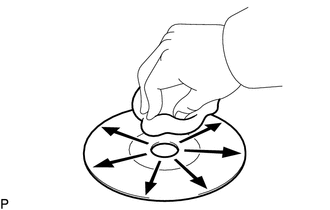
Check the CD.
- OK:
The CD is clean.
- NOTICE:
-
Do not use a conventional record cleaner or antistatic preservative.
- HINT:
-
If the CD is dirty, clean the CD by wiping the CD surface radially with a soft cloth.
OK
2.CHECK CD
NG
CLEAN CD
2.CHECK CD
a.
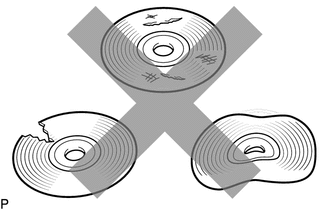
Check that the CD is not deformed or cracked.
- OK:
No deformation or cracks on the CD
OK
3.CHECK OPERATION OF ANOTHER CD
NG
END (CD WAS DEFECTIVE)
3.CHECK OPERATION OF ANOTHER CD
a.
Check using another CD.
i.
Check if the problem recurs using another CD.
- OK:
The problem does not occur.
OK
END (CD WAS DEFECTIVE)
NG
4.CHECK RADIO AND DISPLAY RECEIVER ASSEMBLY
4.CHECK RADIO AND DISPLAY RECEIVER ASSEMBLY
a.
Check the radio and display receiver assembly installation condition.
i.
Check that the radio and display receiver assembly is properly installed.
- OK:
The radio and display receiver assembly is properly installed.
OK
REPLACE RADIO AND DISPLAY RECEIVER ASSEMBLY
NG
REINSTALL RADIO AND DISPLAY RECEIVER ASSEMBLY PROPERLY