POWER STEERING SYSTEM (for Sedan) > CALIBRATION |
| TORQUE SENSOR ZERO POINT CALIBRATION (USING TECHSTREAM) |
Center the steering wheel and align the front wheels straight ahead.
Connect the Techstream to the DLC3.
Turn the ignition switch to ON and turn the Techstream on.
Enter the following menus: Chassis / EMPS / Utility / Torque Sensor Adjustment.
Initialize the torque sensor zero point calibration signal and perform the zero point calibration by following the prompts on the tester screen.
| TORQUE SENSOR ZERO POINT CALIBRATION (USING SST CHECK WIRE) |
|
Center the steering wheel and align the front wheels straight ahead.
Initialize the torque sensor zero point calibration signal.
Stop the vehicle and turn the ignition switch to OFF.
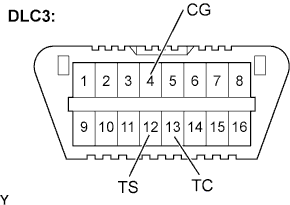
Using SST, connect terminals TS and CG of the DLC3.
Using SST, connect terminals TC and CG of the DLC3.
Turn the ignition switch to ON.
Disconnect and reconnect terminal TC of the DLC3 20 times or more within 20 seconds.
Check that DTC C1515/15 is output.
Perform the torque sensor zero point calibration.
Stop the vehicle and turn the ignition switch to OFF.
Using SST, connect terminals TS and CG of the DLC3 and turn the ignition switch to ON.
Wait for 7 seconds after the EPS warning light comes on.
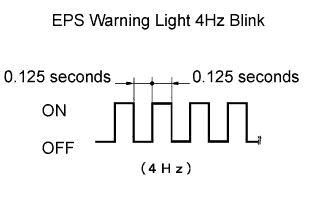 |
Confirm that the EPS warning light blinks at intervals of 0.125 seconds (4Hz blink).
Disconnect the SST.
Confirm that no DTCs are output.