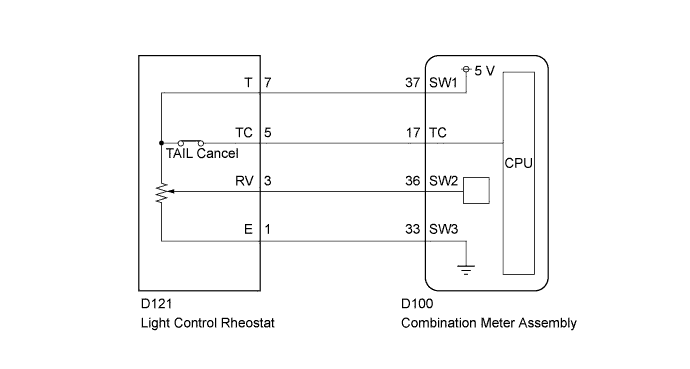
METER / GAUGE SYSTEM (for Hatchback) > Operating Light Control Rheostat does not Change Light Brightness |
| 1.READ VALUE USING TECHSTREAM (LIGHT CONTROL RHEOSTAT) |
Operate the Techstream according to the display and select "Data List" (Click here).
| Tester Display | Measurement Item/Range | Normal Condition | Diagnostic Note |
| Tail Cancel SW | Tail cancel switch/ OFF or ON | OFF: Tail cancel switch off ON: Tail cancel switch on | - |
| Rheostat value | Rheostat value/ Min.: 0 Max.: 100 | Light control rheostat switch is Dark (0) → Bright (100) | Unit: % |
|
| ||||
| OK | ||
 | ||
| ||
| 2.INSPECT LIGHT CONTROL RHEOSTAT |
Inspect the light control rheostat (Click here).
|
| ||||
| OK | |
 |
| 3.CHECK HARNESS AND CONNECTOR (COMBINATION METER - LIGHT CONTROL RHEOSTAT) |
Disconnect the D100 combination meter assembly connector.
Disconnect the D121 light control rheostat connector.
Measure the resistance according to the value(s) in the table below.
| Tester Connection | Condition | Specified Condition |
| D100-37 (SW1) - D121-7 (T) | Always | Below 1 Ω |
| D100-36 (SW2) - D121-3 (RV) | Always | Below 1 Ω |
| D100-33 (SW3) - D121-1 (E) | Always | Below 1 Ω |
| D100-17 (TC) - D121-5 (TC) | Always | Below 1 Ω |
|
| ||||
| OK | ||
| ||
| ||

