RM36W0E
_56
Audio / Visual / Telematics
_088616
NAVIGATION / MULTI INFO DISPLAY
_0421953
NAVIGATION ECU
A
NAVIGATION / MULTI INFO DISPLAY NAVIGATION ECU REMOVAL
PROCEDURE

 1. PRECAUTION
55405B
2.REMOVE INSTRUMENT CLUSTER FINISH CENTER PANEL SUB-ASSEMBLY
55670A
3.REMOVE INSTRUMENT PANEL CENTER REGISTER ASSEMBLY
86140A
4.REMOVE RADIO AND DISPLAY RECEIVER ASSEMBLY WITH BRACKET
86841
5.REMOVE NAVIGATION ECU WITH BRACKET
a.
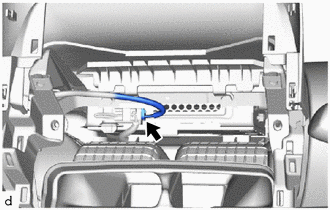
Disconnect the connector.
b.
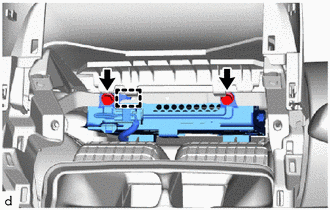
Remove the 2 bolts.
c.
Disengage the guide to remove the navigation ECU with bracket.
d.
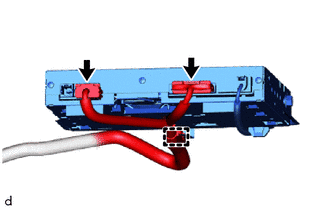
Disconnect the 2 connectors.
e.
Disengage the clamp.
86101H
6.REMOVE ANTENNA CORD SUB-ASSEMBLY
a.
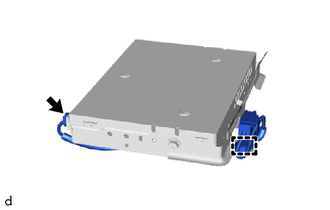
Disconnect the connector.
b.
Disengage the clamp to remove the antenna cord sub-assembly.
86457
7.REMOVE NO. 1 MULTI-MEDIA MODULE BRACKET
a.
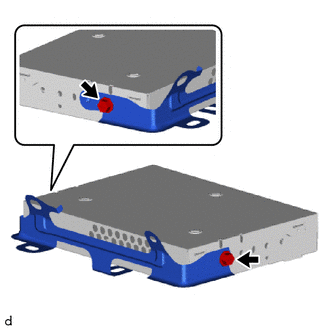
Remove the 2 bolts.
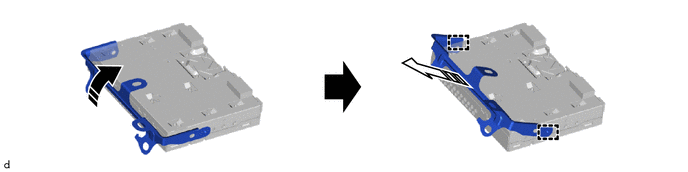
b.
Disengage the guide to remove the No. 1 multi-media module bracket from the navigation ECU as shown in the illustration.
0,0 0,0
false

|
Remove in this Direction (1) | 
|
Remove in this Direction (2) |