TELEMATICS TELEMATICS TRANSCEIVER INSTALLATION
PROCEDURE

 86719B
1.INSTALL NO. 2 TELEPHONE BRACKET
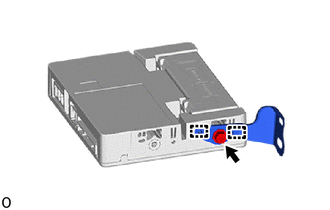
Engage the No. 2 telephone bracket with the screw.
86719A
2.INSTALL NO. 1 TELEPHONE BRACKET
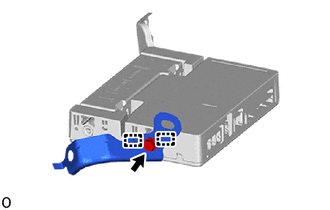
Engage the No. 1 telephone bracket with the screw.
3.INSTALL TELEMATICS TRANSCEIVER WITH BRACKET
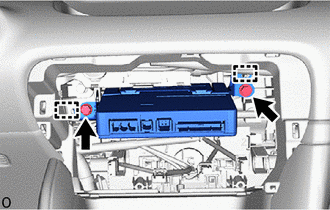
Engage the 2 guides.
Install the telematics transceiver with bracket with the 2 bolts.
- Torque:
- 12.5 N*m (127 kgf*cm, 9 ft.*lbf)
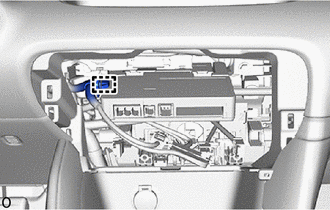
Engage the 1 clamp to install the telematics transceiver with bracket.
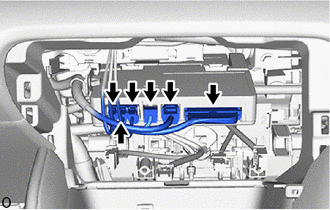
Connect the 4 connectors.
55406B
4.INSTALL INSTRUMENT CLUSTER FINISH PANEL SUB-ASSEMBLY LOWER CENTER (for Manual Air Conditioning System)
55900
5.INSTALL AIR CONDITIONING CONTROL ASSEMBLY (for Automatic Air Conditioning System)
6. INITIALIZATION AFTER RECONNECTING AUXILIARY BATTERY TERMINAL
Click hereGeneral>SETUP>WHEN DISCONNECTING OR RECONNECTING BATTERY TERMINAL>WORK PROCEDURE
- HINT:
-
When disconnecting and reconnecting the auxiliary battery, there is an automatic learning function that completes learning when the respective system is used.
-
Click hereGeneral>SETUP>WHEN DISCONNECTING OR RECONNECTING BATTERY TERMINAL>AUTOMATIC LEARNING CHART