TELEMATICS MAYDAY BATTERY INSTALLATION
CAUTION / NOTICE / HINT
- CAUTION:
- ·
Risk of explosion if the battery is replaced by an incorrect type.Replace battery with thesame type.
·Risk of explosion or the leakage of flammable liquid or gas.
-Do not use in /store in /bring into environment of extremely high temperature orextremely low pressure due to the very high altitude.
-Do not attempt to burn, crush, or cut used battery.
PROCEDURE

 86725
1.INSTALL MOBILEPHONE BATTERY
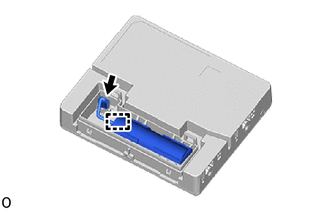
Install the mobilephone battery.
- NOTICE:
-
Make sure that the mobilephone battery issecurely installed.
Connect the connector.
- NOTICE:
-
Make sure that the connector is connected securely.
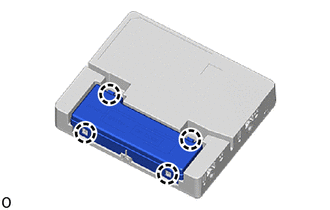
Engage the 4 claws to install the cover.
- NOTICE:
-
Make sure that the cover is securely installed.
86740
2.INSTALL TELEMATICS TRANSCEIVER
3. INITIALIZATION AFTER RECONNECTING AUXILIARY BATTERY TERMINAL
Click hereGeneral>SETUP>WHEN DISCONNECTING OR RECONNECTING BATTERY TERMINAL>WORK PROCEDURE
- HINT:
-
When disconnecting and reconnecting the auxiliary battery, there is an automatic learning function that completes learning when the respective system is used.
-
Click hereGeneral>SETUP>WHEN DISCONNECTING OR RECONNECTING BATTERY TERMINAL>AUTOMATIC LEARNING CHART