MAINTENANCE G16E-GTS AUXILIARY BATTERY INSTALLATION
PROCEDURE

 1.INSTALL AUXILIARY BATTERY
Install the auxiliary battery.
Install the battery clamp sub-assembly to the body with the nut and bolt.
- Torque:
- Bolt : 11.5 N*m (117 kgf*cm, 8 ft.*lbf)
- Nut : 5.4 N*m (55 kgf*cm, 48 in.*lbf)
Connect the battery hose to the auxiliary battery.
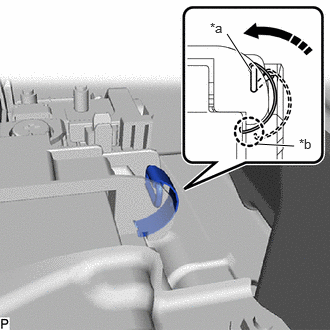
| *a | Locked Position |
| *b | Engage here |

|
Install in this Direction |
Engage the spring assembly as shown in the illustration.
Connect the cable to the positive (+) auxiliary battery terminal and tighten the nut.
- Torque:
- 5.4 N*m (55 kgf*cm, 48 in.*lbf)
Engage the claw and install the fusible link cover.
2.CONNECT CABLE TO NEGATIVE AUXILIARY BATTERY TERMINAL
Connect the cable to the negative (-) auxiliary battery terminal and tighten the nut.
- Torque:
- 5.4 N*m (55 kgf*cm, 48 in.*lbf)
58410B
3.INSTALL DECK BOARD ASSEMBLY
4. INITIALIZATION AFTER RECONNECTING AUXILIARY BATTERY TERMINAL
Click hereGeneral>SETUP>WHEN DISCONNECTING OR RECONNECTING BATTERY TERMINAL>WORK PROCEDURE
- HINT:
-
When disconnecting and reconnecting the battery, there is an automatic learning function that completes learning when the respective system is used.
-
Click hereGeneral>SETUP>WHEN DISCONNECTING OR RECONNECTING BATTERY TERMINAL>AUTOMATIC LEARNING CHART