RM36W0E
_56
Audio / Visual / Telematics
_088597
AUDIO / VIDEO
_0475155
AUDIO AND VISUAL SYSTEM(for Radio and Display Type with TAS Type)
D
AUDIO / VIDEO AUDIO AND VISUAL SYSTEM(for Radio and Display Type with TAS Type) OPERATION CHECK
CHECK SPEAKER
- HINT:
- ·
This function is used when checking the speaker wiring and whether the speakers are functioning properly.
·Illustrations may differ from the actual vehicle screen depending on the device settings and options. Therefore, some detailed areas may not be shown exactly the same as on the actual vehicle screen.
a.
Enter diagnostic mode.
b.
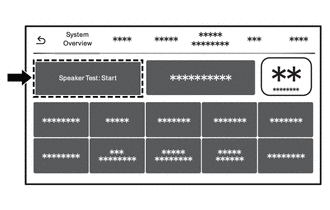
Select "Speaker Test: Start" from the "System Overview" screen.
c.
Check whether beep tones from each speaker.
- HINT:
- ·
"Speaker Test: Stop" is displayed during the speaker check.
·Speaker test will loop until "Speaker Test: Stop" is selected again.
·Beep tone will be played clockwise from front LH side.
·The sounding order during speaker check cannot be adjusted.