ANTI-LOCK BRAKE SYSTEM (for Sedan) > TEST MODE PROCEDURE |
| TEST MODE (SIGNAL CHECK) PROCEDURE (USING INTELLIGENT TESTER) |
Turn the ignition switch off.
Check that the steering wheel is in the straight-ahead position.
A/T: Check that the shift lever is in the P position and apply the parking brake.
M/T: Check that the shift lever is in neutral and apply the parking brake.
![]() |
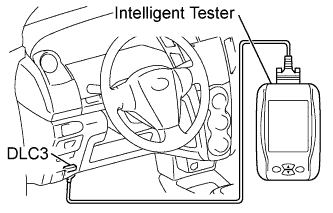
Connect the intelligent tester to the DLC3.
Turn the ignition switch to ON.
Turn the tester on.
Switch the skid control ECU to test mode using the intelligent tester.
Select the following menu items: Chassis / ABS/VSC/TRC / Utility / Signal Check.
![]() |
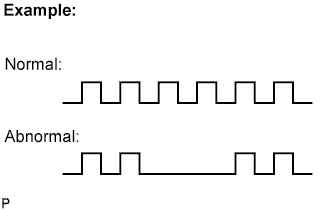
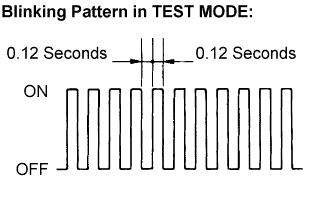
Check that the ABS warning light blinks as shown in the illustration.
| Section Title | See Page |
| ABS Warning Light does not Come ON |
Click here
|
| TS and CG Terminal Circuit |
Click here
|
Start the engine.
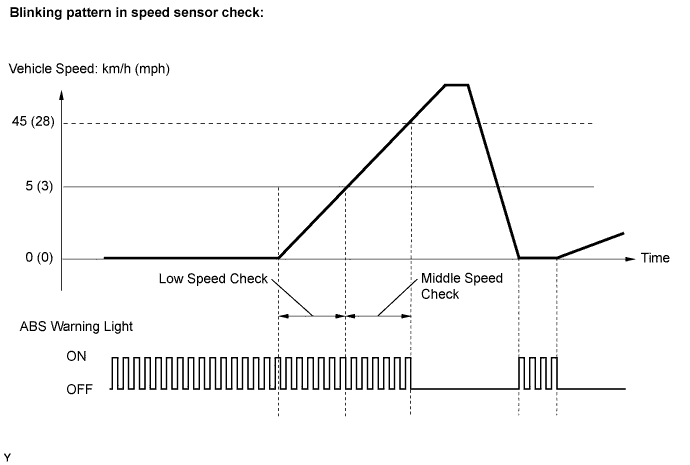
| SPEED SENSOR CHECK (USING INTELLIGENT TESTER) |
![]() |
Check that the ABS warning light is blinking as shown in the illustration.
Check the speed sensor signal.
Drive the vehicle straight forward at a speed of 45 km/h (28 mph) or more for several seconds.
Check that the ABS warning light goes off.

Stop the vehicle.
| END OF SENSOR CHECK (USING INTELLIGENT TESTER) |
When the sensor check is successfully completed, the ABS warning light blinks in the test mode pattern when the vehicle is stopped, and goes off when the vehicle is driven.
| READ SIGNAL CHECK FUNCTION DTCS (USING INTELLIGENT TESTER) |
Read the DTC(s) by following the instructions on the tester screen.
| TEST MODE (SIGNAL CHECK) PROCEDURE (USING SST CHECK WIRE) |
Turn the ignition switch off.
Check that the steering wheel is in the straight-ahead position.
A/T: Check that the shift lever is in the P position and apply the parking brake.
M/T: Check that the shift lever is in neutral and apply the parking brake.
![]() |
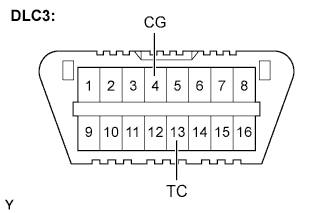
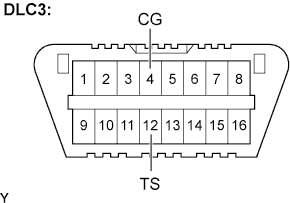
Using SST, connect terminals TS and CG of the DLC3.
Turn the ignition switch to ON.
![]() |
Check that the ABS warning light blinks as shown in the illustration.
| Section Title | See Page |
| ABS Warning Light does not Come ON |
Click here
|
| TS and CG Terminal Circuit |
Click here
|
Start the engine.
| SPEED SENSOR CHECK (USING SST CHECK WIRE) |
![]() |
Check that the ABS warning light blinks as shown in the illustration.
Check the speed sensor signal.
Drive the vehicle straight forward at a speed of 45 km/h (28 mph) or more for several seconds, and then step on the brake pedal.
Check that the ABS warning light goes off.

Stop the vehicle.
| END OF SENSOR CHECK (USING INTELLIGENT TESTER) |
When the sensor check is successfully completed, the ABS warning light blinks in the test mode pattern when the vehicle is stopped, and goes off when the vehicle is driven.
| READ DTC OF SIGNAL CHECK FUNCTION (USING SST CHECK WIRE) |
![]() |
Using SST, connect terminals TC and CG of the DLC3.
Turn the ignition switch toON.
Read the number of blinks of the ABS warning light.
![]() |
After the check, disconnect the SST from terminals TC and CG of the DLC3.
Turn the ignition switch off.
| SPEED SENSOR CHECK FUNCTION DTCs |
| Code No. | Diagnosis | Trouble Areas |
| C1271/71 | Low output signal of front speed sensor RH |
|
| C1272/72 | Low output signal of front speed sensor LH |
|
| C1273/73 | Low output signal of rear speed sensor RH |
|
| C1274/74 | Low output signal of rear speed sensor LH |
|
| C1275/75 | Abnormal change in output signal of front speed sensor RH |
|
| C1276/76 | Abnormal change in output signal of front speed sensor LH |
|
| C1277/77 | Abnormal change in output signal of rear speed sensor RH |
|
| C1278/78 | Abnormal change in output signal of rear speed sensor LH |
|
![]() |