STANDARD PROCEDURE
ERASING TRANSMITTER CODES
NOTE: Individual channels cannot be erased. Erasing the transmitter codes will erase ALL programmed codes.
To erase programming from the three buttons (individual buttons cannot be erased but can be “reprogrammed” - note below), follow the step noted:
- Press and hold the two outer HomeLink® buttons and release only when the Electronic Vehicle Information Center (EVIC) display shows “Channels Cleared” (after 20 seconds). Release both buttons. Do not hold for longer that 30 seconds. HomeLink® is now in the train (or learning) mode and can be programmed at any time, (Refer to 8 - ELECTRICAL/OVERHEAD CONSOLE/UNIVERSAL TRANSMITTER - STANDARD PROCEDURE).
PROGRAMMING TRANSMITER CODES
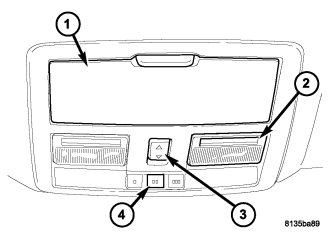
CAUTION: Vehicle exhaust contains carbon monoxide, a dangerous gas. Do not run the vehicle's exhaust while training the transceiver. Exhaust gas can cause serious injury or death.
CAUTION: Your motorized door or gate will open and close while you are training the Universal Transceiver. Do not train the transceiver if people or pets are in the path of the door or gate. A moving door or gate can cause serious injury or death to people and pets or damage to objects.
The Electronic Vehicle Information Center (EVIC) features a driver-interactive display which includes HomeLink® system messages. The EVIC is located in the upper part of the cluster between the speedometer and tachometer.
1. Press and hold the two outer HomeLink® buttons (4), and release only when the EVIC display shows “Channels Cleared” (after 20 seconds). Do not hold the buttons for longer than 30 seconds and do not repeat step one to program a second and/or third hand-held transmitter to the remaining two HomeLink® buttons.
2. Position the end of your hand-held transmitter 1-3 inches (3-8 cm) away from the HomeLink® buttons.
3. Simultaneously press and hold both the HomeLink® button that you want to train and the hand-held transmitter buttons. Do not release the buttons until step 4 has been completed.
4. The EVIC display will show “Channel X Training” (where X is Channel 1, 2, or 3). Release both buttons after the EVIC display shows “Channel X Trained”.
NOTE: If the EVIC display shows “Did Not Train” repeat steps 2–4.
5. Press and hold the just trained HomeLink® button and observe the EVIC display. If the EVIC display shows “Channel X Transmit” (where X is Channel 1, 2, or 3), programming is complete and your device should activate when the HomeLink® button is pressed and released.
NOTE: To program the remaining two HomeLink® buttons, begin with “Programming” step two. Do not repeat step one.
NOTE: If your hand-held transmitter appears to program the universal transceiver, but your garage door does not operate using the transmitter and your garage door opener was manufactured after 1995, your garage door opener may have a multiple security code system (rolling code system). Please proceed to steps 6–8 to complete the programming of a rolling code equipped device (most common garage door openers require this step.
6. At the garage door opener receiver (motor-head unit) in the garage, locate the “learn” or “smart” button. This can usually be found where the hanging antenna wire is attached to the motor-head unit.
7. Firmly press and release the “learn” or “smart” button. (The name and color of the button may vary by manufacturer.)
NOTE: There are 30 seconds in which to initiate step eight.
8. Return to the vehicle and firmly press, hold for two seconds and release the programmed HomeLink® button. Repeat the “press/hold/release” sequence a second time, and, depending on the brand of the garage door opener (or other rolling code equipped device), repeat this sequence a third time to complete the programming.
9. HomeLink® should now activate your rolling code equipped device.
10. To program the remaining two HomeLink® buttons, begin with “Programming” step two. Do not repeat step one.
REPROGAMMING TRANSMITTER CODES
CAUTION: Vehicle exhaust contains carbon monoxide, a dangerous gas. Do not run the vehicle's exhaust while training the transceiver. Exhaust gas can cause serious injury or death.
CAUTION: Your motorized door or gate will open and close while you are training the Universal Transceiver. Do not train the transceiver if people or pets are in the path of the door or gate. A moving door or gate can cause serious injury or death to people and pets or damage to objects.
To program a device to HomeLink® using a HomeLink® button previously trained, follow these steps:
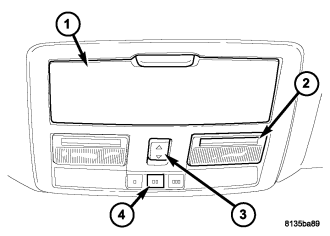
- Press and hold the desired HomeLink® button (4). Do NOT release the button.
- The Electronic Vehicle Information center (EVIC) display will show “Channel X Transmit” (where X is Channel 1, 2, or 3) for 20 seconds and then change to “Channel X Training”. Without releasing the HomeLink® button, proceed to step 3.
- Position the end of your hand-held transmitter 1-3 inches (3-8 cm) away from the HomeLink® buttons.
- Simultaneously press and hold both the HomeLink® button that you want to train and the hand-held transmitter buttons. Do not release the buttons until step 5 has been completed.
- Press and hold the just trained HomeLink® button and observe the EVIC display. If the EVIC display shows “Channel X Transmit” (where X is Channel 1, 2, or 3), programming is complete and your device should activate when the HomeLink® button is pressed and released.
NOTE: To program the remaining two HomeLink® buttons, begin with “Programming” step two. Do not repeat step one.
NOTE: If your hand-held transmitter appears to program the universal transceiver, but your garage door does not operate using the transmitter and your garage door opener was manufactured after 1995, your garage door opener may have a multiple security code system (rolling code system). Please proceed to steps 6–8 to complete the programming of a rolling code equipped device (most common garage door openers require this step.
- At the garage door opener receiver (motor-head unit) in the garage, locate the “learn” or “smart” button. This can usually be found where the hanging antenna wire is attached to the motor-head unit.
- Firmly press and release the “learn” or “smart” button. (The name and color of the button may vary by manufacturer.)
NOTE: There are 30 seconds in which to initiate step eight.
- Return to the vehicle and firmly press, hold for two seconds and release the programmed HomeLink® button. Repeat the “press/hold/release” sequence a second time, and, depending on the brand of the garage door opener (or other rolling code equipped device), repeat this sequence a third time to complete the programming.
- HomeLink® should now activate your rolling code equipped device.