B2206-CURRENT VIN MISSING/MISMATCH
For a complete wiring diagram Refer to Section 8W.
- When Monitored:
During power-up, the Occupant Restraint Controller (ORC) and Occupant Classification Module (OCM) monitors the CAN bus for the VIN message.
- Set Condition:
This DTC will set if the VIN information received from the Powertrain Control Module (PCM) is different from the stored VIN.
| Possible Causes |
| INCORRECT VIN PROGRAMMED INTO THE PCM |
| OCCUPANT CLASSIFICATION MODULE (OCM) |
Diagnostic Test
1. CHECK FOR ACTIVE DTCNOTE: Troubleshoot any Ignition, Battery, Seat Weight Sensor, or OCM Internal DTCs BEFORE proceeding
NOTE: Ensure that the battery is fully charged.
NOTE: This DTC cannot be cleared until the *OCM SYSTEM VERIFICATION TEST has been completed successfully.
With the scan tool, read DTCs.
Select the module and DTC type.
OCM-Active
- Go To 2
OCM-Stored
- Erase code with scan tool, test complete.
2. CHECK THE VIN STORED IN THE PCM
With the scan tool, compare the VIN that is stored in the PCM to the VIN of the vehicle's VIN plate.
Does the VIN stored in the PCM match the vehicle's VIN?
Yes
- Go To 3
No
- Replace and Configure the Powertrain Control Module in accordance with the service information.
- Perform *(NGC) POWERTRAIN VERIFICATION TEST VER - 5. Refer to (Refer to 9 - ENGINE - DIAGNOSIS AND TESTING).
Diagnostic Test
3. PERFORM THE OCCUPANT CLASSIFICATION MODULE SYSTEM VERIFICATION TESTNOTE: Ensure that the battery is fully charged.
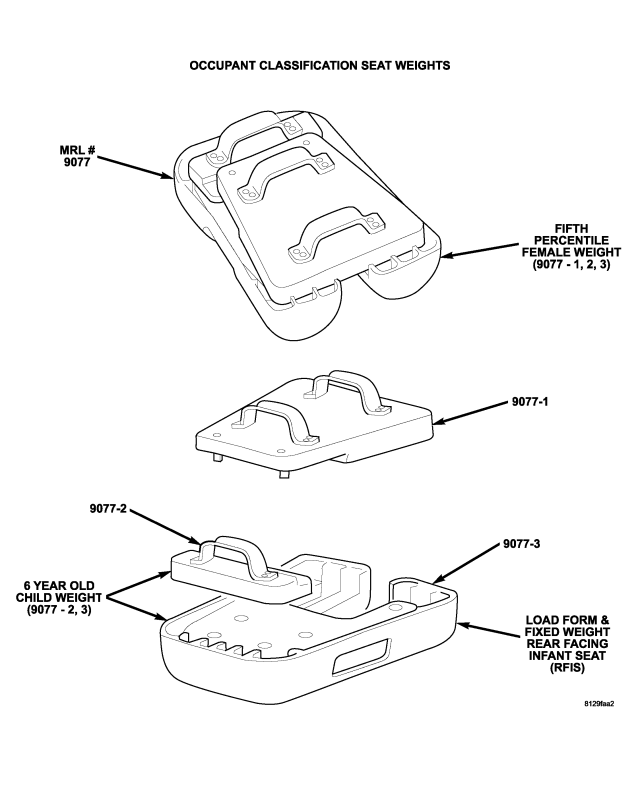
NOTE: The Occupant Classification Seat Weights 9077 are required to perform this test.
Verify that the passenger seat is empty.
Remove any special tools or jumper wires and reconnect all previously disconnected components – except the battery.
WARNING: To avoid personal injury or death, turn the ignition on, then reconnect the battery.
NOTE: Failure to follow the test instructions or aborting the test will cause faults to set when performing the Occupant Classification Module System Verification Test. To prevent faults due to process errors: verify that all tests steps that led you here were performed as directed; verify that the ignition is in run; Wait 30 seconds after changing the seat weight before proceeding to allow the system to stabilize; only press scan tool buttons when directed to do so; and perform the Occupant Classification Module System Verification Test to completion.
With the scan tool in OCM, select More Options, select System Tests, and select Occupant Classification Module System Verification Test. Run the test by following the instructions displayed on the scan tool. When the test is complete, wait two minutes, and then proceed as follows.
With the scan tool, read OCM DTCs.
Does the scan tool display any active: B2206-CURRENT VIN MISSING/MISMATCH DTCs?
Yes
- Go To 4
No
- Perform *AIRBAG SYSTEM VERIFICATION TEST - VER 1.
4. PERFORM OCCUPANT CLASSIFICATION MODULE SYSTEM VERIFICATION TEST
WARNING: To avoid personal injury or death, turn the ignition off, disconnect the battery and wait two minutes before proceeding.
Verify that the passenger seat is empty.
Verify that all of the Seat Weight Sensor mounting screws are tightened to torque specification. Refer to Group 23 for specification.
NOTE: Failure to follow the test instructions or aborting the test will cause faults to set when performing the Occupant Classification Module System Verification Test. To prevent faults due to process errors: verify that all tests steps that led you here were performed as directed; verify that the ignition is in run; Wait 30 seconds after changing the seat weight before proceeding to allow the system to stabilize; only press scan tool buttons when directed to do so; and perform the Occupant Classification Module System Verification Test to completion.
With the scan tool in OCM, select More Options, select System Tests, and select Occupant Classification Module System Verification Test. Run the test by following the instructions displayed on the scan tool. When the test is complete, proceed as follows.
With the scan tool, read OCM DTCs.
Does the scan tool display active: B2206-CURRENT VIN MISSING/MISMATCH?
Yes
- Replace the OCM in accordance with the Service Information.
- replace the Service Kit if a seat from another vehicle was installed.
- Perform *OCM SYSTEM VERIFICATION TEST.
No - But Other DTCs Present
- Diagnose and repair the other DTCs. Refer to the Table of Contents in this Section for a complete list of symptoms.
No - No Active DTCs Present
- Erase all codes before returning vehicle to customer.