Screen Flicker or Color Distortion
Circuit diagnosis
INSPECTION PROCEDURE
| 1. CHECK DISPLAY SETTING |

Enter the display adjustment screen by pressing the "DISP" switch.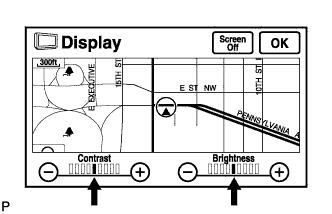

Reset display settings (contrast, brightness) and check that the screen appears normal.
Press the "INFO" switch and then select "Screen Setting."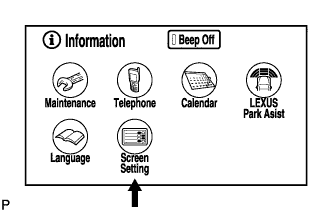
Set the "Switch Color" to "Blue" (initial setting) and check if the display returns to normal.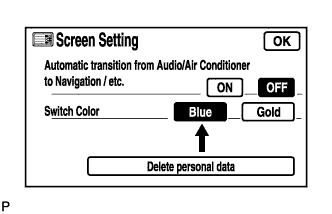
- OK:
- Returns to normal.
|
|
||||

| OK | ||
 |
||
| ||
| 2. CHECK CABIN |
Check that the cabin temperature is warmer than -20°C (-4.0°F).
- OK:
- Cabin is warmer than -20°C (-4.0°F).
|
|
||||

| OK | |
 |
| 3. CHECK COLOR BAR (DISPLAY CHECK MODE) |
Enter the "Display Check" mode (Color Bar Check) (Click here).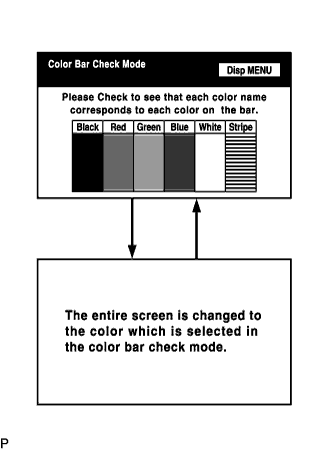
Check that the color bars match the displayed names.
- OK:
- Color bars match the displayed names.
|
|
||||
| OK | |
|
| 4. CHECK NAVI COLOR BAR (NAVIGATION CHECK MODE) |
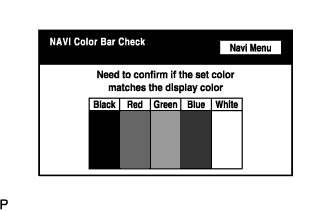 |
Enter the "Navigation Check" mode (NAVI Color Bar Check) (Click here).
Check that the color bars match the displayed names.
- OK:
- Color bars match the displayed names.
|
|
||||
| NG | ||
|
||
| ||