The Other Caller cannot Hear Your Voice, or Your Voice is too Quiet or Distorted
Circuit diagnosis
INSPECTION PROCEDURE
| 1. CHECK CELLULAR PHONE |

Check if the other side can hear your voice properly.
- OK:
- Your voice can be heard correctly.
|
|
||||

| OK | |
 |
| 2. CHECK SETTINGS |
Check if the mute switch is set to ON.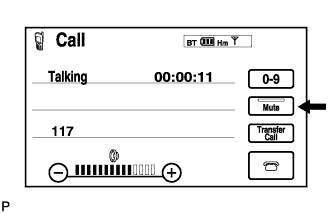

- OK:
- Mute switch is not set to ON.
|
|
||||
| OK | |
|
| 3. CHECK SETTINGS |
Enter the "Handsfree Voice Quality Set" mode (Click here).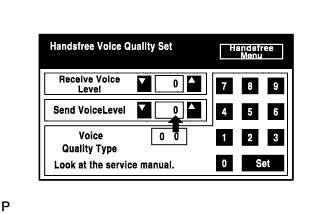
Check if the Send Voice Level is set to "0".
- HINT:
- The Send Voice Level can be set to 11 different levels, -5 to +5, with a 3 dB difference.
Check if the Send Voice Level is set to the minimum or maximum level.
- HINT:
- When the Send Voice Level is set to the minimum or maximum level, the sound may be distorted.
- OK:
- The Send Voice Level is set to "0".
|
|
||||
| OK | |
|
| 4. CHECK MICROPHONE (DISPLAY CHECK MODE) |
Enter the "MICROPHONE & VOICE RECOGNITION CHECK" mode (Click here).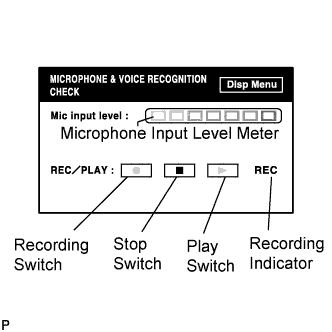
When voice is input into the microphone, check that the microphone input level meter changes according to the input voice.
Push the recording switch and perform voice recording.
- HINT:
- Voice can be recorded up to 5 seconds.
Check that the recording indicator remains on while recording and that the recorded voice is played normally without noise or distortion.
- OK:
- All check results are normal.
|
|
||||
| OK | ||
 |
||
| ||