| Last Modified: 11-27-2007 | 1.6 C | |
| Service Category: Audio/Visual/Telematics | Section: Navigation/Multi Info Display | |
| Model Year: 2008 | Model: LX570 | Doc ID: RM00000182U02RX |
| Title: NAVIGATION / MULTI INFO DISPLAY: NAVIGATION SYSTEM: DESCRIPTION (2008 LX570) | ||
|
DTC |
58-42 |
Map Disc Read Error |
|
DTC |
80-42 |
Map Disc Read Error |
DESCRIPTION
|
DTC Code |
DTC Detection Condition |
Trouble Area |
|---|---|---|
|
58-42 |
Access to an invalid address due to a software error. |
Display and navigation module display |
|
80-42 |
Access to an invalid address due to a software error. |
INSPECTION PROCEDURE
HINT:
After the inspection is completed, clear the DTCs
 .
.
PROCEDURE
|
1. |
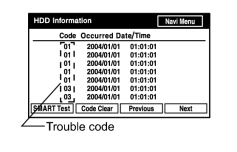
CHECK HDD INFORMATION (NAVIGATION CHECK MODE) |
|
(a) Enter the "Navigation Check" mode and select "HDD Information"
|
(b) Check for trouble codes.
OK:
Trouble code is not output.
|

|
2. |
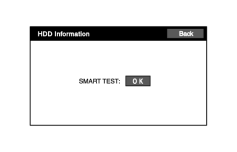
CHECK SMART TEST |
|
(a) Press the "SMART Test" switch, and check the SMART TEST result screen. HINT:
OK: OK is displayed. |
|
|
3. |
CLEAR DTC |
(a) Clear DTCs
.
|
|
4. |
RECHECK DTC |
(a) Recheck for DTCs and check if the same trouble code is output.
OK:
No DTC is output.
|

|

|