| Last Modified: 11-27-2007 | 1.6 A | |
| Service Category: Audio/Visual/Telematics | Section: Cellular Communication | |
| Model Year: 2008 | Model: LX570 | Doc ID: RM000002LJB003X |
| Title: CELLULAR COMMUNICATION: MAYDAY ECU: INSTALLATION (2008 LX570) | ||
INSTALLATION
HINT:
A bolt without a torque specification is shown in the standard bolt chart
 .
.
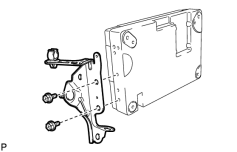
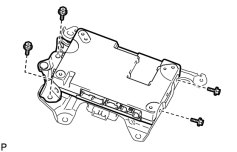
1. INSTALL TELEPHONE ECU ASSEMBLY
|
(a) Install the bracket to the ECU with the 2 screws. Torque: 3.0 N·m (31 kgf·cm, 27 in·lbf) |
|
(b) Install the ECU to the bracket with the 4 screws. Torque: 3.0 N·m (31 kgf·cm, 27 in·lbf) |
2. INSTALL MAYDAY BATTERY WITH BRACKET
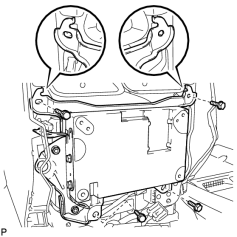
3. INSTALL TELEPHONE ECU ASSEMBLY WITH BRACKET
|
(a) Attach the 2 claws of the bracket as shown in the illustration. |
(b) Install the ECU with bracket with the 4 bolts.
Torque: 12 N·m (122 kgf·cm, 9 ft·lbf)
|
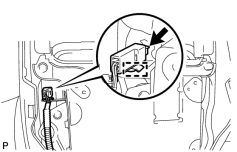
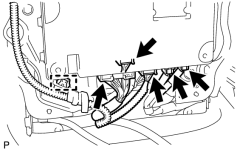
(c) Connect the connector and clamp. |
|
(d) Connect the connectors and clamp. |
4. INSTALL REAR CONSOLE END PANEL SUB-ASSEMBLY
5. CONNECT CABLE TO NEGATIVE BATTERY TERMINAL
NOTICE:
When disconnecting the cable, some systems need to be initialized after the cable is reconnected
.
6. INSTALL ENGINE ROOM SIDE COVER LH
7. CHECK SRS WARNING LIGHT
(a) Check the SRS warning light
.
8. PERFORM REGISTRATION
(a) Perform registration
.
NOTICE:
When replacing the portable phone battery or telephone ECU (together with the portable phone battery), perform registration.

|

|