| Last Modified: 11-27-2007 | 1.6 J | |
| Service Category: Audio/Visual/Telematics | Section: Navigation/Multi Info Display | |
| Model Year: 2008 | Model: LX570 | Doc ID: RM000002V42003X |
| Title: NAVIGATION / MULTI INFO DISPLAY: NAVIGATION SYSTEM: INSPECTION PROCEDURE (2008 LX570) | ||
|
Audio cannot be Recorded to HDD |
INSPECTION PROCEDURE
HINT:
If the cabin temperature is low (-20°C (-4°F) or less), or high (65°C (149°F) or higher), recording may not be possible. In this case, use the A/C, etc. to adjust the cabin temperature.
PROCEDURE
|
1. |
CHECK ERROR MESSAGE |
(a) When recording audio, check if the "RECORDING ERROR" message is displayed.
Result
|
Result |
Proceed to |
|---|---|
|
Not displayed |
A |
|
Displayed |
B |
|

|
2. |
CHECK AUDIO OFF SETTING |
(a) Check if the setting is AUDIO OFF.
HINT:
When set to AUDIO OFF, audio recording is not possible.
OK:
AUDIO ON.
|
|
3. |
CHECK DISC |
(a) Check that the CD is not dirty or scratched.
OK:
Not dirty or scratched.
|
|
4. |
CHECK DISC |
(a) Check if the disc is a finalized disc with audio already recorded on it.
OK:
Blank disc.
|
|
5. |
CHECK DISC |
(a) Check if the disc is copy-protected.
OK:
Disc can be copied.
|
|
6. |
CHECK AUDIO SYSTEM SETTING |
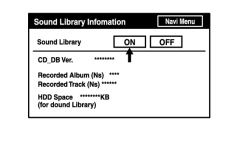
(a) Change to "Navigation Check" mode
 .
.
|
(b) At the Sound Library Information screen, check that the HDD audio recording function is set to "Sound Library ON". OK: Set to "Sound Library ON". |
|
|
7. |
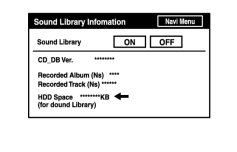
CHECK HDD SPACE |
|
(a) Check if there is enough HDD space. OK: There is enough HDD space. |
|
|
8. |
CHECK AVC-LAN PLUS |
(a) Perform the AVC-LAN plus check
.
|

|

|