| Last Modified: 11-27-2007 | 1.6 A | |
| Service Category: Audio/Visual/Telematics | Section: Park Assist/Monitoring | |
| Model Year: 2008 | Model: LX570 | Doc ID: RM000003EA7000X |
| Title: PARK ASSIST / MONITORING: ULTRASONIC SENSOR (for Rear): REMOVAL (2008 LX570) | ||
REMOVAL
1. REMOVE REAR QUARTER PANEL MUDGUARD LH

2. REMOVE REAR QUARTER PANEL MUDGUARD RH
3. REMOVE REAR NO. 1 BUMPER PLATE
4. REMOVE REAR BUMPER COVER
5. REMOVE NO. 2 FRAME WIRE
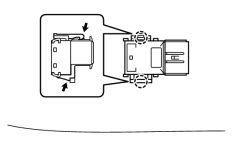
6. REMOVE NO. 2 ULTRASONIC SENSOR
HINT:
Use the same procedure to remove the No. 2 ultrasonic sensor on the other side.
(a) While pushing down on the lever with a finger to release the one claw, detach the claw on the other side to remove the ultrasonic sensor.
HINT:
The type of claw on the top and the type of claw on the bottom of the sensor are different. Observe the claws carefully before removing the sensor.
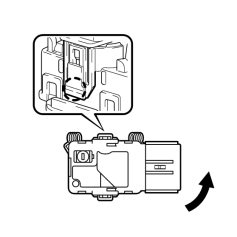
7. REMOVE NO. 3 ULTRASONIC SENSOR
HINT:
Use the same procedure to remove the No. 3 ultrasonic sensor on the other side.
(a) Remove the ultrasonic sensor clip.
(b) Detach the claw and remove the ultrasonic sensor as shown in the illustration.
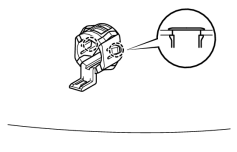
8. REMOVE NO. 2 ULTRASONIC SENSOR RETAINER
HINT:
Use the same procedure to remove the No. 2 ultrasonic sensor retainer on the other side.
(a) Detach the 2 claws and remove the ultrasonic sensor retainer from the rear bumper cover.
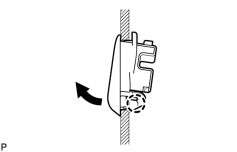
9. REMOVE NO. 3 ULTRASONIC SENSOR RETAINER
HINT:
Use the same procedure to remove the No. 3 ultrasonic sensor retainer on the other side.
(a) Detach the claw and remove the ultrasonic sensor retainer from the rear bumper cover.

|

|