INSTALLATION
Removal / installation
| 1. INSTALL REAR CIRCUIT BREAKER SENSOR |

Install the rear circuit breaker sensor (RH).
Install the circuit breaker sensor (RH) with the 2 bolts.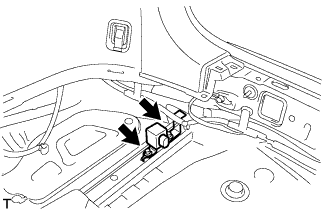

- Torque:
- 8.0 N*m{ 82 kgf*cm , 71 in.*lbf }
Connect the connector to the rear circuit breaker sensor (RH).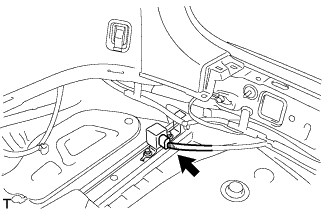
Install the rear circuit breaker sensor (LH).
Install the rear circuit breaker sensor (LH) with the 2 bolts.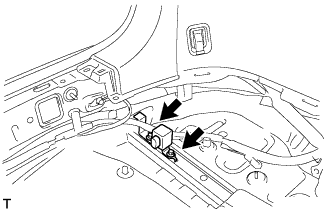
- Torque:
- 8.0 N*m{ 82 kgf*cm , 71 in.*lbf }
Connect the connector to the rear circuit breaker sensor (LH).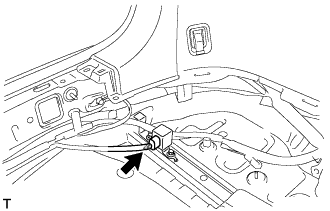
| 2. INSTALL DECK SIDE TRIM BOX RH |
| 3. INSTALL DECK SIDE TRIM BOX LH |
Install the deck side trim box with the 2 clips.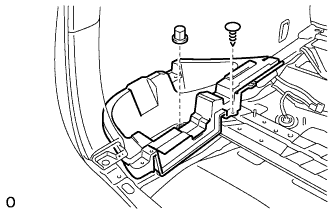
| 4. INSTALL DECK BOARD SUB-ASSEMBLY NO.3 |
Install the deck No.3 board sub-assembly with the 2 bolts and 2 nuts.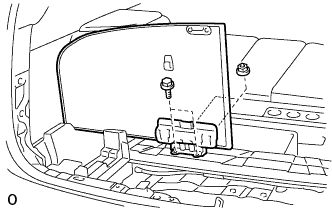
| 5. INSTALL DECK BOARD SUB-ASSEMBLY NO.2 |
Install the deck No.2 board sub-assembly with the 4 bolts and 2 nuts.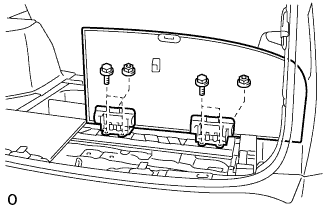
| 6. INSTALL DECK FLOOR BOX FRONT |
Install the deck floor box front with the 2 clips.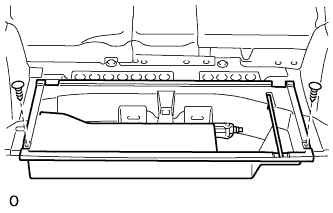
| 7. INSTALL REAR FLOOR FINISH PLATE |
Engage the 2 claws and 6 clips, and install the rear floor finish plate.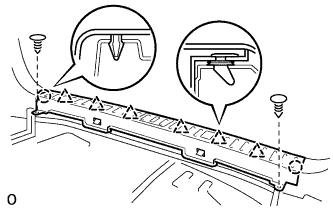
Install the 2 clips.
| 8. INSTALL DECK FLOOR BOX REAR |
Install the deck floor box rear with the 2 clips.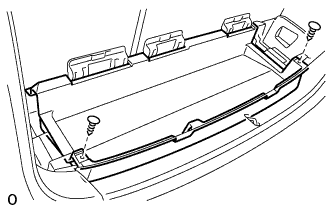
| 9. INSTALL DECK BOARD SUB-ASSEMBLY |
Install the deck board sub-assembly with the 2 bolt.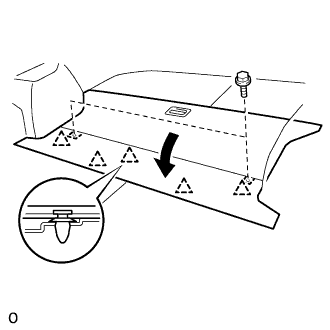
Engage the 5 clips.
| 10. CONNECT CABLE TO NEGATIVE BATTERY TERMINAL |
| 11. PERFORM INITIALIZATION |