Previous Next

Front Hub & Knuckle Assembly

Removal & Installation

To Remove:

  1. Remove the front speed sensor.
  2. Remove the cotter pin.
  3. Using special tool #MB990767, remove the drive shaft nut.
  4. To remove the caliper assembly, secure the caliper assembly with wire to avoid placing load on the brake hose.
  5. Remove the Brake Disc.

    CAUTION
    Make sure you tie the cord of the special tool to the nearby part. Also, loosen the nut but do not remove it.

  6. Disconnect the Lower Arm Ball Joint using special tool #MB991113.
  7. Remove the split pin.
  8. Disconnect the Tie Rod End.
  9. Remove the drive shaft.
  10. Remove the front strut mounting bolt.
  11. Remove the hub and knuckle.

To Install:

  1. Install the hub and knuckle.
  2. Install the front strut mounting bolt.
  3. Install the drive shaft.
  4. Connect the Tie Rod End.
  5. Install the split pin.
  6. Connect the Lower Arm Ball Joint.
  7. Install the Brake Disc.
  8. Install the caliper assembly.

    CAUTION
    There should be no load on the wheel bearings when the drive shaft nut is tightened.
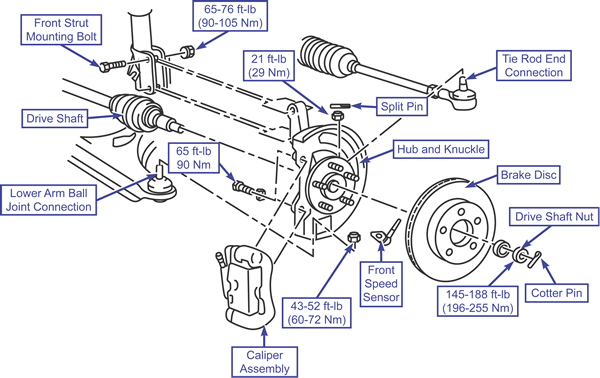
  9. When installing the drive shaft nut, do the following:
  10. Install the cotter pin.
  11. Install the front speed sensor.

Previous Next