AUDIO / VIDEO RADIO RECEIVER INSTALLATION
PROCEDURE

 86212C
1.INSTALL NO. 2 RADIO BRACKET
Install the No. 2 radio bracket with the 3 screws.
- Torque:
- 2.5 N*m (25 kgf*cm, 22 in.*lbf)
86211J
2.INSTALL NO. 1 RADIO BRACKET
Install the No. 1 radio bracket with the 3 screws.
- Torque:
- 2.5 N*m (25 kgf*cm, 22 in.*lbf)
C8215
3.INSTALL HAZARD SWITCH WIRE
Connect the connector.
Attach the 2 clamps to install the hazard switch wire.
86140A
4.INSTALL RADIO AND DISPLAY RECEIVER ASSEMBLY WITH BRACKETS
Connect each connector.
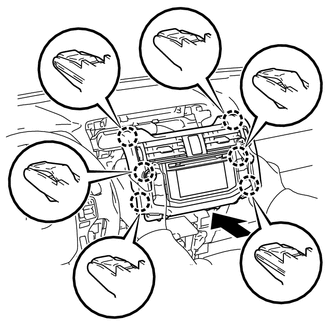
Insert the radio and display receiver assembly with brackets to attach the 6 claws on its backside.
- NOTICE:
-
When inserting the radio and display receiver assembly with brackets, do not press its knobs on it.
Install the radio and display receiver assembly with brackets with the 4 bolts.
- Torque:
- 13 N*m (127 kgf*cm, 9 ft.*lbf)
55910R
5.INSTALL HEATER CONTROL ASSEMBLY
55475A
6.INSTALL NO. 2 INSTRUMENT CLUSTER FINISH PANEL GARNISH
55474C
7.INSTALL NO. 1 INSTRUMENT CLUSTER FINISH PANEL GARNISH