Home › Engine / Hybrid System › 1GR-FE ENGINE CONTROL › SFI SYSTEM

DTC    P060E    Internal Control Module Throttle Position Performance

for Preparation Click here


DESCRIPTION

The ECM monitors the input signals of the throttle position sensor No. 1 and stop light switch. As the ECM monitors the input signals of the throttle position sensor No. 1 and the STP signals of the stop light switch, if the input signals and control signals deviate, this DTC is stored.

DTC No.
DTC Detection Condition
Trouble Area
P060E
There is an ECM main CPU error.
ECM

MONITOR STRATEGY


Related DTCs
P060E: Internal Control Module, Throttle Position
Required sensors/Components (Main)
ECM
Required sensors/Components (Related)
-
Frequency of operation
Continuous
Duration
1 second: Throttle sensor fail
13 times: Brake switch signal fail
MIL operation
Immediate
Sequence of operation
None

TYPICAL ENABLING CONDITIONS


DMA communication error
Not detected

TYPICAL MALFUNCTION THRESHOLDS


One of the following conditions is met:
Condition 1 or 2
1. Difference of main throttle position and sub throttle position
0.3 V or higher
2. Difference of main stop light switch signal and sub stop light switch signal
Different

CONFIRMATION DRIVING PATTERN


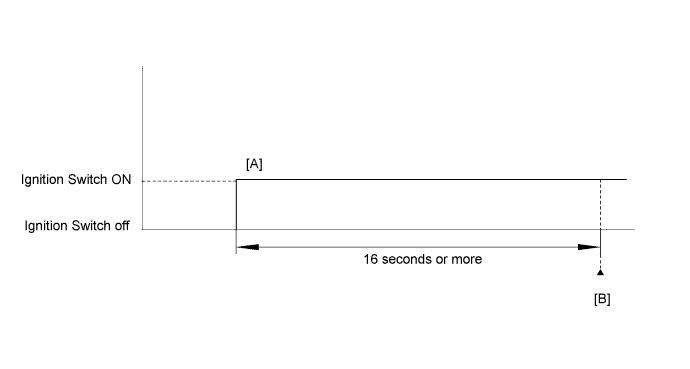
A199238E02

  1. Connect the Techstream to the DLC3.
  2. Turn the ignition switch to ON and turn the Techstream on.
  3. Clear the DTCs (even if no DTCs are stored, perform the clear DTC operation).
  4. Turn the Techstream off.
  5. Turn the ignition switch off.
  6. Disconnect the Techstream.
  7. Disconnect the cable from the negative (-) battery terminal and wait for 1 minute.
  8. Connect the cable to the negative (-) battery terminal.
  9. Connect the Techstream to the DLC3.
  10. Turn the ignition switch to ON and turn the Techstream on [A].
  11. Wait 16 seconds or more.
  12. Enter the following menus: Powertrain / Engine and ECT / Trouble Codes [B].
  13. Read the DTCs.

    HINT:
    1. If a DTC is output, the system is malfunctioning.
    2. If a DTC is not output, perform the following procedure.

  14. Enter the following menus: Powertrain / Engine and ECT / Utility / All Readiness.
  15. Input the DTC: P060E.
  16. Check the DTC judgment result.

    Techstream Display
    Description
    NORMAL
    1. DTC judgment completed
    2. System normal
    ABNORMAL
    1. DTC judgment completed
    2. System abnormal
    INCOMPLETE
    1. DTC judgment not completed
    2. Perform driving pattern after confirming DTC enabling conditions
    N/A
    1. Unable to perform DTC judgment
    2. Number of DTCs which do not fulfill DTC preconditions has reached ECU's memory limit

    HINT:
    1. If the judgment result shows NORMAL, the system is normal.
    2. If the judgment result shows ABNORMAL, the system has a malfunction.

  17. If the test result is INCOMPLETE or N/A and no pending DTC is output, perform a universal trip and check for permanent DTCs (Click here).

    HINT:
    1. If a permanent DTC is output, the system is malfunctioning.
    2. If no permanent DTC is output, the system is normal.


INSPECTION PROCEDURE

1.CHECK FOR DTC
  1. Clear DTCs (Click here).

  1. Turn the ignition switch off.

  1. Disconnect the cable from the negative (-) battery terminal and wait for 1 minute.

  1. Connect the cable to the negative (-) battery terminal.

  1. Turn the ignition switch to ON.

  1. Check for DTCs.

    OK:
    P060E is not output.


NG
REPLACE ECM (Click here)
OK

CHECK FOR INTERMITTENT PROBLEMS (Click here)