RM2090E
_58
Vehicle Interior
_060705
POWER OUTLETS (INT)
_0297754
REAR POWER OUTLET SOCKET
A
POWER OUTLETS (INT) REAR POWER OUTLET SOCKET REMOVAL
PROCEDURE

 58810J
1.REMOVE CONSOLE BOX ASSEMBLY
85530D
2.REMOVE NO. 2 POWER OUTLET SOCKET ASSEMBLY
a.
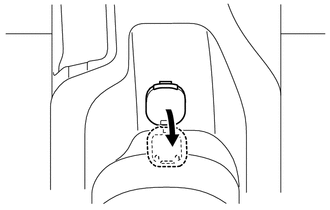
Open the cap of the No. 2 power outlet socket cover.
b.
2.81,0.347 3.034,0.531
0.223,0.185
10
*1
2.825,0.488 2.558,0.662
false
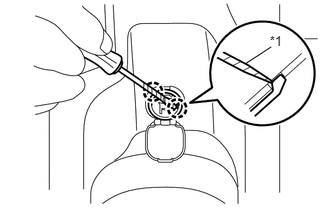
Using a screwdriver, disengage the claw and remove the No. 2 power outlet socket assembly.
| *1 | Protective Tape |
- HINT:
-
Tape the screwdriver tip before use.
85535E
3.REMOVE NO. 2 POWER OUTLET SOCKET COVER
a.
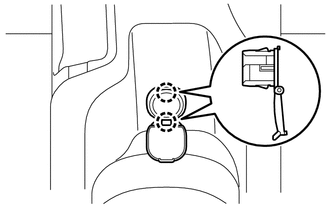
Disengage the 2 claws and remove the No. 2 power outlet socket cover.