M20A-FXS ENGINE CONTROL ECM INSTALLATION
PROCEDURE

 89667E
1.INSTALL NO. 1 ECM BRACKET
Install the No. 1 ECM bracket to the ECM with the 2 screws.
- Torque:
- 4.5 N*m (46 kgf*cm, 40 in.*lbf)
89668
2.INSTALL NO. 2 ECM BRACKET
Install the No. 2 ECM bracket to the ECM with the 2 screws.
- Torque:
- 4.5 N*m (46 kgf*cm, 40 in.*lbf)
89661
3.INSTALL ECM
Install the ECM with the bolt and nut.
- Torque:
- Bolt : 12.5 N*m (127 kgf*cm, 9 ft.*lbf)
- Nut : 8.0 N*m (82 kgf*cm, 71 in.*lbf)
- NOTICE:
-
If the ECM has been struck or dropped, replace it.
Engage the 2 clamps.
Install the engine wire to the No. 1 ECM bracket with the bolt.
- Torque:
- 10 N*m (102 kgf*cm, 7 ft.*lbf)
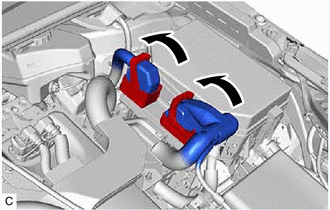
Connect the 2 ECM connectors and lower the 2 lock levers.
- NOTICE:
- ·
When connecting the ECM connectors, make sure that dirt, water or other foreign matter does not contact the connecting parts of the ECM connectors.
·Be sure to securely connect the ECM connectors.
4.CONNECT CABLE TO NEGATIVE AUXILIARY BATTERY TERMINAL
5. INITIALIZATION AFTER RECONNECTING AUXILIARY BATTERY TERMINAL
Click hereGeneral>SETUP>WHEN DISCONNECTING OR RECONNECTING BATTERY TERMINAL>WORK PROCEDURE
- HINT:
-
When disconnecting and reconnecting the auxiliary battery, there is an automatic learning function that completes learning when the respective system is used.
-
Click hereGeneral>SETUP>WHEN DISCONNECTING OR RECONNECTING BATTERY TERMINAL>AUTOMATIC LEARNING CHART
6.PERFORM INITIALIZATION