AUDIO / VIDEO INSTRUMENT PANEL SPEAKER INSTALLATION
PROCEDURE

 86160P
1.INSTALL FRONT NO. 2 SPEAKER ASSEMBLY
Connect the connector.
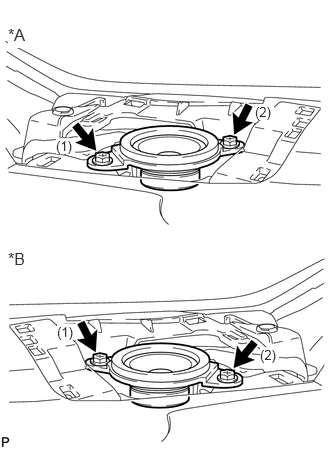
| *A | LH Side |
| *B | RH Side |
Install the front No. 2 speaker assembly with the 2 screws.
- NOTICE:
-
Do not touch the speaker cone.
- HINT:
-
Install the screws in the order shown in the illustration.
55408F
2.INSTALL INSTRUMENT PANEL SPEAKER PANEL SUB-ASSEMBLY
62212
3.INSTALL FRONT PILLAR GARNISH
62312B
4.INSTALL FRONT DOOR OPENING TRIM WEATHERSTRIP
for LH side: Click hereVehicle Interior>INTERIOR PANELS / TRIM>ROOF HEADLINING>INSTALLATION
for RH side: Click hereVehicle Interior>INTERIOR PANELS / TRIM>ROOF HEADLINING>INSTALLATION
86160J
5.INSTALL FRONT NO. 3 SPEAKER ASSEMBLY (for 10 Speakers)
Connect the connector.
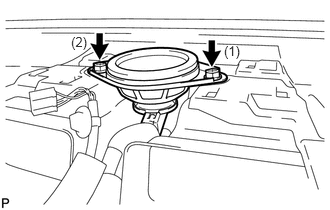
Install the front No. 3 speaker assembly with the 2 screws.
- NOTICE:
-
Do not touch the speaker cone.
- HINT:
-
Install the screws in the order shown in the illustration.
55510F
6.INSTALL NO. 1 SPEAKER OPENING COVER ASSEMBLY (for 10 Speakers)
55660
7.INSTALL NO. 2 INSTRUMENT PANEL REGISTER ASSEMBLY (for 10 Speakers)
55405B
8.INSTALL CENTER INSTRUMENT CLUSTER FINISH PANEL SUB-ASSEMBLY (for 10 Speakers)