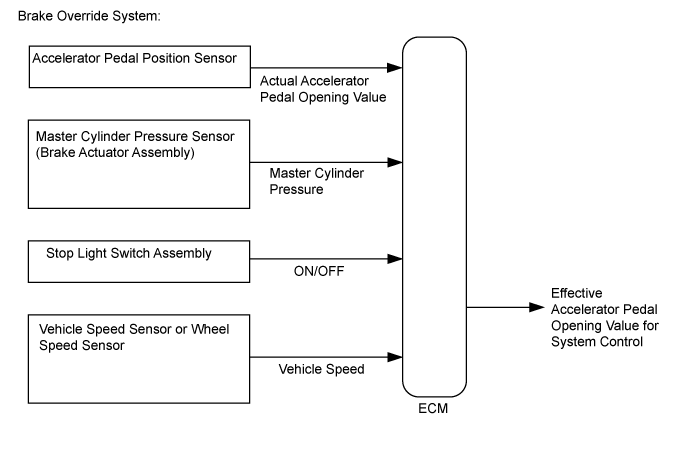
SFI SYSTEM > Brake Override System |
| 1.CHECK DTC OUTPUT |
Connect the GTS to the DLC3.
Turn the engine switch on (IG) and turn the GTS on.
Enter the following menus: System Select / Health Check.
Read the DTCs.
| Result | Proceed to |
| DTCs are not output | A |
| DTCs are output | B |
|
| ||||
| A | |
 |
| 2.READ VALUE USING GTS (MASTER CYLINDER SENSOR) |
Connect the GTS to the DLC3.
Start the engine and turn the GTS on.
Enter the following menus: Chassis / ABS/VSC/TRC / Data List / Master Cylinder Sensor.
Read the value displayed on the GTS.
Check that the brake fluid pressure value of the "Master Cylinder Sensor" observed on the GTS changes when the brake pedal is depressed.
|
| ||||
| OK | |
|
| 3.READ VALUE USING GTS (STOP LIGHT SW) |
Connect the GTS to the DLC3.
Turn the engine switch on (IG) and turn the GTS on.
Enter the following menus: Powertrain / Engine / Data List / All Data / Stop Light SW.
Check the Data List indication when the brake pedal is depressed and released.
| GTS Display | Condition | Specified Condition |
| Stop Light SW | Brake pedal released | OFF |
| Brake pedal depressed | ON |
|
| ||||
| OK | |
|
| 4.INSPECT BRAKE PEDAL SUPPORT ASSEMBLY |
Inspect and adjust the brake pedal support assembly (Click here).
|
| ||||
| OK | |
|
| 5.READ VALUE USING GTS (ACCELERATOR PEDAL POSITION SENSOR) |
Connect the GTS to the DLC3.
Turn the engine switch on (IG) and turn the GTS on.
Enter the following menus: Powertrain / Engine / Data List / All Data / Accelerator Position Sensor No.1 Voltage % and Accelerator Position Sensor No.2 Voltage %.
Read the value displayed on the GTS.
| GTS Display | Condition | Specified Condition |
| Accelerator Position Sensor No.1 Voltage % | Accelerator Pedal Released → Depressed → Released | Values smoothly change following accelerator pedal operation |
| Accelerator Position Sensor No.2 Voltage % |
|
| ||||
| OK | |
|
| 6.READ VALUE USING GTS (VEHICLE SPEED) |
Connect the GTS to the DLC3.
Turn the engine switch on (IG) and turn the GTS on.
Start the engine.
Enter the following menus: Powertrain / Engine / Data List / All Data / Vehicle Speed.
Read the value displayed on the GTS.
| GTS Display | Condition | Specified Condition |
| Vehicle Speed | Vehicle stopped, engine running | 0 km/h (0 mph) |
| Vehicle being driven at constant speed between 16.1 to 64.4 km/h (10 to 40 mph) | No large fluctuations when driving at a constant speed |
|
| ||||
| OK | |
|
| 7.READ VALUE USING GTS (FR, FL, RR, RL WHEEL SPEED) |
Connect the GTS to the DLC3.
Turn the engine switch on (IG) and turn the GTS on.
Start the engine.
Enter the following menus: Chassis / ABS/VSC/TRC / Data List / FR Wheel Speed, FL Wheel Speed, RR Wheel Speed and RL Wheel Speed.
Read the value displayed on the GTS.
| GTS Display | Condition | Specified Condition |
| FR Wheel Speed FL Wheel Speed RR Wheel Speed RL Wheel Speed | Vehicle stopped, engine running | 0 km/h (0 mph) |
| Vehicle being driven at constant speed between 16.1 to 64.4 km/h (10 to 40 mph) | No large fluctuations when driving at a constant speed |
|
| ||||
| OK | ||
 | ||
| ||
