Open in One Side of CAN Branch Line
Circuit diagnosis · Vehicles built Jul 2007 – Jul 2009
Versions by build date: Jul 2007 – Jul 2009 Aug 2009 – Oct 2010 Nov 2010 – Jul 2011 Aug 2011 – Jul 2012 from Aug 2012
DESCRIPTION
If 2 or more ECUs and/or sensors do not appear on the Techstream "CAN Bus Check" screen via the CAN VIM, one side of the CAN branch wire may be open. (one side of the CAN-H [branch wire] / CANL [branch wire] of the ECU and/or sensor is open.)| Symptom |
Trouble Area |
| 2 or more ECUs and/or sensors do not appear on Techstream "CAN Bus Check" screen via CAN VIM. |
|
WIRING DIAGRAM
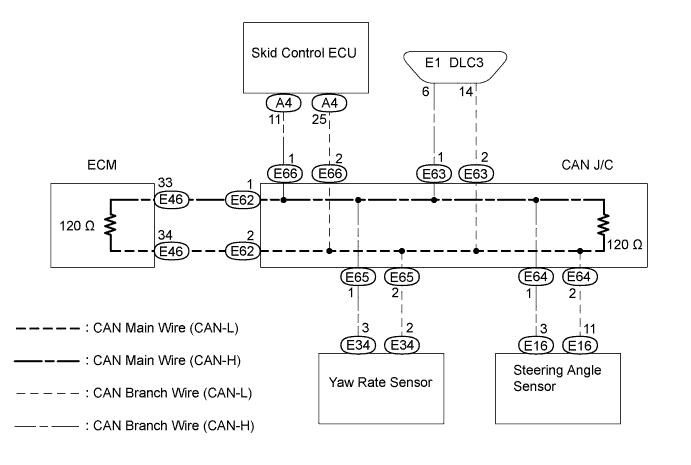

INSPECTION PROCEDURE
- NOTICE:
- Turn the ignition switch off before measuring the resistances of the CAN main wire and the CAN branch wire.
- After the ignition switch is turned off, check that the key reminder warning system is not in operation.
- Before measuring the resistance, leave the vehicle as is for at least 1 minute and do not operate the ignition switch, any other switches or the doors. If doors need to be opened in order to check connectors, open the doors and leave them open.
- HINT:
- Operating the ignition switch, any switches or any doors triggers related ECU and sensor communication with the CAN, which causes resistance variation.
- Turn the ignition switch off before measuring the resistances of the CAN main wire and the CAN branch wire.
- HINT:
- The following is the troubleshooting procedure of an open in either CANH or CANL of the ECU A (SENSOR A).
- Perform the following inspection for the ECUs (sensors) which are not displayed on the Techstream. If malfunctions cannot be identified, then perform the following inspection for the ECUs (sensors) connected to CAN communication.
- The following is the troubleshooting procedure of an open in either CANH or CANL of the ECU A (SENSOR A).
| 1. CHECK OPEN IN ONE SIDE OF CAN BRANCH WIRE (SKID CONTROL ECU) |

Disconnect the skid control ECU connector.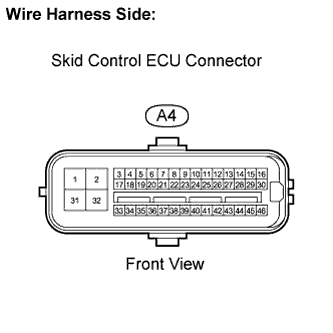
Select "CAN Bus Check" on the Techstream via the CAN VIM (Click here).
- Result:
Result
Proceed to
ABS/VSC/TRAC not displayed on the Techstream.
A
Several ECUs and sensors other than ABS/VSC/TRAC not displayed on Techstream.
B
|
|
||||

| A | |
 |
| 2. CHECK OPEN IN ONE SIDE OF CAN BRANCH WIRE (SKID CONTROL ECU BRANCH WIRE) |
Measure the resistance.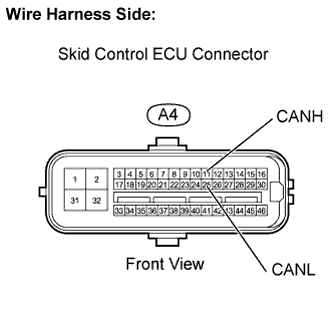
- Standard resistance.:
Tester Connection
Condition
Specified Condition
A4-11 (CANH) - A4-25 (CANL)
Ignition switch OFF
54 to 69 Ω
|
|
||||

| OK | ||
 |
||
| ||
| 3. CHECK OPEN IN ONE SIDE OF CAN BRANCH WIRE (YAW RATE SENSOR) |
Disconnect the yaw rate sensor connector.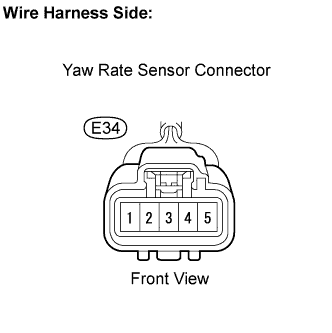
Select "CAN Bus Check" on the Techstream via the CAN VIM (Click here).
- Result:
Result
Proceed to
YAW/DECELERATE not displayed on the Techstream.
A
Several ECUs and sensors other than YAW/DECELERATE not displayed on Techstream.
B
|
|
||||
| A | |
|
| 4. CHECK OPEN IN ONE SIDE OF CAN BRANCH WIRE (YAW RATE SENSOR BRANCH WIRE) |
Measure the resistance.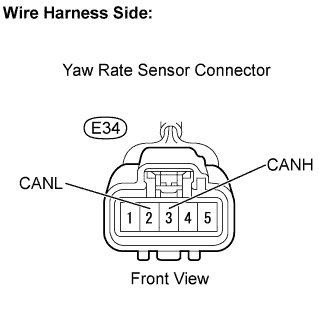
- Standard resistance.:
Tester Connection
Condition
Specified Condition
E34-3 (CANH) - E34-2 (CANL)
Ignition switch OFF
54 to 69 Ω
|
|
||||
| OK | ||
|
||
| ||
| 5. CHECK OPEN IN ONE SIDE OF CAN BRANCH WIRE (STEERING ANGLE SENSOR BRANCH WIRE) |
Disconnect the steering angle sensor connector.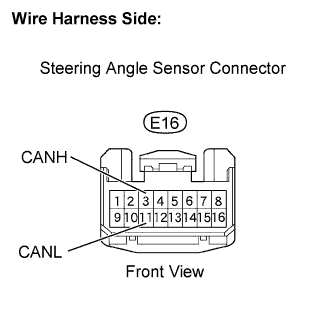
Measure the resistance.
- Standard resistance.:
Tester Connection
Condition
Specified Condition
E16-3 (CANH) - E16-11 (CANL)
Ignition switch OFF
54 to 69 Ω
|
|
||||
| OK | ||
|
||
| ||