TEST MODE PROCEDURE
Troubleshooting · Vehicles built from Jan 2017
Versions by build date: Oct 2014 – Dec 2014 Jan 2015 – Dec 2016 from Jan 2017
| WARNING LIGHT AND INDICATOR LIGHT INITIAL CHECK |
Release the parking brake.
- NOTICE:
- Before releasing the parking brake, move the shift lever to P for safety (for Automatic Transmission) or use wheel chocks to secure the vehicle (for Manual Transmission).
- HINT:
- When the parking brake is applied or the brake fluid level is low, the brake warning light comes on.
When the ignition switch is turned to ON, check that the ABS warning light comes on for approximately 3 seconds.
- HINT:
- If the skid control ECU (brake actuator assembly) stores any DTCs, the ABS warning light will come on.
- If any of the indicators remain on or do not come on, proceed to troubleshooting for the light circuits listed below.
- If the skid control ECU (brake actuator assembly) stores any DTCs, the ABS warning light will come on.
Trouble Area
See Procedure
ABS warning light circuit (Remains on)
Click here
ABS warning light circuit (Does not come on)
Click here
| SENSOR CHECK USING TEST MODE (SIGNAL CHECK) (When Using GTS) |
- HINT:
- If the ignition switch is turned from ON to ACC or off during Test Mode (signal check), DTCs recorded during the sensor check will be cleared.
- During Test Mode (signal check), the skid control ECU (brake actuator assembly) records all DTCs detected in the sensor check. By performing Test Mode (signal check), the codes are cleared if a normal condition is confirmed. The remaining codes are the codes indicating where an abnormality was found.
- If the ignition switch is turned from ON to ACC or off during Test Mode (signal check), DTCs recorded during the sensor check will be cleared.
Procedure to enter Test Mode.
Turn the ignition switch off.
Check that the steering wheel is in the straight-ahead position.
Apply the parking brake.
Check that the shift lever is in P (for Automatic Transmission).
Check that the shift lever is in neutral (for Manual Transmission).
Connect the GTS to the DLC3.
Turn the ignition switch to ON.
Turn the GTS on.
Switch the skid control ECU (brake actuator assembly) to Test Mode using the GTS.
Enter the following menus: Chassis / ABS/VSC/TRC / Utility / Signal Check.Check that the ABS warning light comes on for several seconds and then blinks in the Test Mode blinking pattern.
- HINT:
- If the ABS warning light does not blink, inspect the TS and CG terminal circuit and ABS warning light circuit.
Trouble Area
See Procedure
TS and CG terminal circuit
Click here
ABS warning light circuit (Remains on)
Click here
ABS warning light circuit (Does not come on)
Click here
Speed Sensor Check
Drive the vehicle straight-ahead.
Accelerate the vehicle to a speed of 45 km/h (28 mph) or more for several seconds and check that the ABS warning light turns off.- The sensor check may not be completed if wheelspin occurs.
- The ABS warning light blinks when the sensor check has been completed and the brake pedal is depressed.
- The ABS warning light comes on immediately after a malfunction has been detected during the speed sensor check.
- The sensor check may not be completed if wheelspin occurs.
Stop the vehicle.
- NOTICE:
- The speed sensor check may not be completed if the sensor check is started with the steering wheel turned or one or more wheels spinning.
- After the ABS warning light turns off and if the vehicle speed exceeds 80 km/h (50 mph), a sensor check code will be stored again. Decelerate or stop the vehicle before the speed reaches 80 km/h (50 mph).
- If the sensor check has not been completed, the ABS warning light blinks during driving and the ABS system does not operate.
- The speed sensor check may not be completed if the sensor check is started with the steering wheel turned or one or more wheels spinning.
End of Sensor Check
If the sensor check is completed, the ABS warning light blinks (Test Mode) when the vehicle stops and the ABS warning light is off while the vehicle is being driven.
- NOTICE:
- If the sensor check is not completed, the ABS warning light blinks even while the vehicle is being driven and the ABS does not operate.
Reading Sensor Check DTCs
Read the DTCs by following the GTS screen.
- NOTICE:
- If only DTCs other than Test Mode sensor check DTCs are displayed, repair the malfunctions and clear the DTCs.
- If Test Mode sensor check DTCs and other DTCs are displayed or if only Test Mode sensor check DTCs are displayed, repair the malfunctions, clear the DTCs, and perform the Test Mode inspection again.
- If only DTCs other than Test Mode sensor check DTCs are displayed, repair the malfunctions and clear the DTCs.
List of DTCs.
ABS Sensor Code No.
Diagnosis
Trouble Area
C1271
Low output signal of front speed sensor RH
- Front speed sensor RH
- Sensor installation
- Skid control rotor
C1272
Low output signal of front speed sensor LH
- Front speed sensor LH
- Sensor installation
- Skid control rotor
C1273
Low output signal of rear speed sensor RH
- Rear speed sensor RH
- Sensor installation
- Skid control rotor
C1274
Low output signal of rear speed sensor LH
- Rear speed sensor LH
- Sensor installation
- Skid control rotor
C1275
Abnormal change in output signal of front speed sensor RH
- Front speed sensor RH
- Skid control rotor
C1276
Abnormal change in output signal of front speed sensor LH
- Front speed sensor LH
- Skid control rotor
C1277
Abnormal change in output signal of rear speed sensor RH
- Rear speed sensor RH
- Skid control rotor
C1278
Abnormal change in output signal of rear speed sensor LH
- Rear speed sensor LH
- Skid control rotor
- HINT:
- The codes in this table are output only in Test Mode (signal check).
- Front speed sensor RH
Turn the ignition switch off and disconnect the GTS.
| SENSOR CHECK USING TEST MODE (SIGNAL CHECK) (When Using SST Check Wire) |
- HINT:
- If the ignition switch is turned from ON to ACC or off during Test Mode (signal check), DTCs recorded during the sensor check will be cleared.
- During Test Mode (signal check), the skid control ECU (brake actuator assembly) records all DTCs detected in the sensor check. By performing Test Mode (signal check), the codes are cleared if a normal condition is confirmed. The remaining codes are the codes indicating where an abnormality was found.
- If the ignition switch is turned from ON to ACC or off during Test Mode (signal check), DTCs recorded during the sensor check will be cleared.
Procedure to enter Test Mode.
Turn the ignition switch off.
Check that the steering wheel is in the straight-ahead position.
Apply the parking brake.
Check that the shift lever is in P (for Automatic Transmission).
Check that the shift lever is in neutral (for Manual Transmission).
Using SST, connect terminals 12 (TS) and 4 (CG) of the DLC3.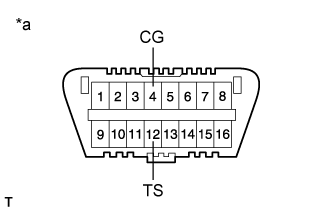

- SST
- 09843-18040
Text in Illustration *a
DLC3
Turn the ignition switch to ON.
Check that the ABS warning light comes on for several seconds and then blink in Test Mode.
- HINT:
- If the ABS warning light does not blink, inspect the 12 (TS) and 4 (CG) terminal circuit and ABS warning light circuit.
Trouble Area
See Procedure
TS and CG terminal circuit
Click here
ABS warning light circuit (Remains on)
Click here
ABS warning light circuit (Does not come on)
Click here
Speed Sensor Check
Drive the vehicle straight-ahead.
Accelerate the vehicle to a speed of 45 km/h (28 mph) or more for several seconds and check that the ABS warning light turns off.- The sensor check may not be completed if wheelspin occurs.
- The ABS warning light blinks when the sensor check has been completed and the brake pedal is depressed.
- The ABS warning light comes on immediately after a malfunction has been detected during the speed sensor check.
- The sensor check may not be completed if wheelspin occurs.
Stop the vehicle.
- NOTICE:
- The speed sensor check may not be completed if the sensor check is started with the steering wheel turned or one or more wheels spinning.
- After the ABS warning light turns off and if the vehicle speed exceeds 80 km/h (50 mph), a sensor check code will be stored again. Decelerate or stop the vehicle before the speed reaches 80 km/h (50 mph).
- If the sensor check has not been completed, the ABS warning light blinks during driving and the ABS system does not operate.
- The speed sensor check may not be completed if the sensor check is started with the steering wheel turned or one or more wheels spinning.
- HINT:
- When the sensor check has been completed, the ABS warning light remains off during driving and blinks in the Test Mode pattern while the vehicle is stationary.
End of Sensor Check
If the sensor check is completed, the ABS warning light blinks (Test Mode) when the vehicle stops and the ABS warning light is off while the vehicle is being driven.
- NOTICE:
- If the sensor check is not completed, the ABS warning light blinks even while the vehicle is being driven and the ABS does not operate.
Reading Sensor Check DTCs
Using SST, connect terminals 12 (TS), 13 (TC) and 4 (CG) of the DLC3.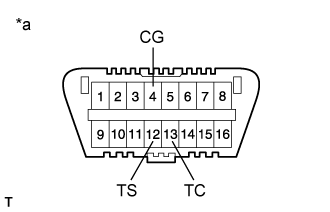
- SST
- 09843-18040
Text in Illustration *a
DLC3
Count the number of blinks of the ABS warning light.
- NOTICE:
- If only DTCs other than Test Mode sensor check DTCs are displayed, repair the malfunctions and clear the DTCs.
- If Test Mode sensor check DTCs and other DTCs are displayed or if only Test Mode sensor check DTCs are displayed, repair the malfunctions, clear the DTCs, and perform the Test Mode inspection again.
- If only DTCs other than Test Mode sensor check DTCs are displayed, repair the malfunctions and clear the DTCs.
- HINT:
- When the system is operating correctly, each light will blink continuously in a pattern of 0.25 seconds on, and then 0.25 seconds off.
- When one DTC is output, each light will output the same code at 4 second intervals (for example, code 21 would be output as 2 flashes, a 1.5 second pause, and then 1 flash).
- When 2 or more DTCs are output, each light will output a different code at 2.5 second intervals, and when all codes have been output, there will be a 4 second pause and the sequence will repeat.
- When multiple codes are stored, they are output in order starting with the lowest DTC number.
- When the system is operating correctly, each light will blink continuously in a pattern of 0.25 seconds on, and then 0.25 seconds off.
After performing the check, disconnect SST from terminals TS and CG, and TC and CG of the DLC3 and turn the ignition switch off.
Turn the ignition switch to ON.
- HINT:
- If the ignition switch is not turned to ON after SST is removed from the DLC3, the previous Test Mode will continue.
- If the ignition switch is turned to ON with terminals TS and CG connected, the previous Test Mode will continue.
- If the ignition switch is not turned to ON after SST is removed from the DLC3, the previous Test Mode will continue.
List of DTCs.
ABS Sensor Code No.
Diagnosis
Trouble Area
71
Low output signal of front speed sensor RH
- Front speed sensor RH
- Sensor installation
- Skid control rotor
72
Low output signal of front speed sensor LH
- Front speed sensor LH
- Sensor installation
- Skid control rotor
73
Low output signal of rear speed sensor RH
- Rear speed sensor RH
- Sensor installation
- Skid control rotor
74
Low output signal of rear speed sensor LH
- Rear speed sensor LH
- Sensor installation
- Skid control rotor
75
Abnormal change in output signal of front speed sensor RH
- Front speed sensor RH
- Skid control rotor
76
Abnormal change in output signal of front speed sensor LH
- Front speed sensor LH
- Skid control rotor
77
Abnormal change in output signal of rear speed sensor RH
- Rear speed sensor RH
- Skid control rotor
78
Abnormal change in output signal of rear speed sensor LH
- Rear speed sensor LH
- Skid control rotor
- HINT:
- The codes in this table are output only in Test Mode (signal check).
- Front speed sensor RH