SUPPLEMENTAL RESTRAINT SYSTEMS KNEE AIRBAG ASSEMBLY INSTALLATION
CAUTION / NOTICE / HINT
- HINT:
- ·
Use the same procedure for RHD and LHD vehicles.
·The procedure listed below is for LHD vehicles.
PROCEDURE

 73900
1.INSTALL LOWER NO. 1 INSTRUMENT PANEL AIRBAG ASSEMBLY
Check that the ignition switch is off.
Check that the cable is disconnected from the negative (-) battery terminal.
- CAUTION:
- ·
Wait at least 90 seconds after disconnecting the cable from the negative (-) battery terminal to disable the SRS system.
·If the airbag deploys for any reason, it may cause a serious accident.
Connect the airbag connector.
- NOTICE:
- ·
When connecting any airbag connector, take care not to damage the airbag wire harness.
·Make sure the lock button is securely locked.
- HINT:
-
Refer to How to Connect or Disconnect Airbag Connector:
- ··
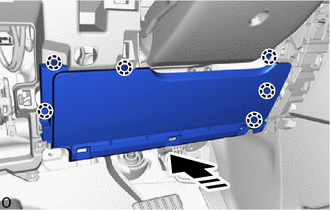

|
Install in this Direction |
Attach the claw to install the lower No. 1 instrument panel airbag assembly.
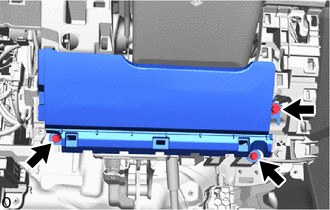
Install the 3 bolts.
- Torque:
- 10 N*m (102 kgf*cm, 7 ft.*lbf)
Check that there is no looseness in the lower No. 1 instrument panel airbag assembly.
55433B
2.INSTALL LOWER NO. 2 INSTRUMENT PANEL FINISH PANEL
55044C
3.INSTALL INSTRUMENT PANEL FINISH PANEL SUB-ASSEMBLY
55432D
4.INSTALL LOWER NO. 1 INSTRUMENT PANEL FINISH PANEL
77306
5.INSTALL FUEL LID LOCK OPEN LEVER SUB-ASSEMBLY
53601
6.INSTALL HOOD LOCK CONTROL LEVER SUB-ASSEMBLY
55641
7.INSTALL NO. 1 INSTRUMENT PANEL UNDER COVER
55318C
8.INSTALL INSTRUMENT SIDE PANEL LH
55011A
9.INSTALL NO. 1 INSTRUMENT PANEL GARNISH SUB-ASSEMBLY
55631A
10.INSTALL NO. 1 INSTRUMENT PANEL UNDER TRAY STOPPER
62112
11.INSTALL COWL SIDE TRIM BOARD LH
67914B
12.INSTALL FRONT DOOR SCUFF PLATE LH
67912A
13.INSTALL FRONT DOOR OUTSIDE SCUFF PLATE LH
14.CONNECT CABLE TO NEGATIVE BATTERY TERMINAL
for 7GR-FKS:
for 1GD-FTV:
15. INITIALIZATION AFTER RECONNECTING BATTERY TERMINAL
Click hereGeneral>SETUP>WHEN DISCONNECTING OR RECONNECTING BATTERY TERMINAL>WORK PROCEDURE
- HINT:
-
When disconnecting and reconnecting the battery, there is an automatic learning function that completes learning when the respective system is used.
-
Click hereGeneral>SETUP>WHEN DISCONNECTING OR RECONNECTING BATTERY TERMINAL>AUTOMATIC LEARNING CHART
16.PERFORM DIAGNOSTIC SYSTEM CHECK
17.CHECK SRS WARNING LIGHT
18.PERFORM SYSTEM INITIALIZATION AND CALIBRATION