DIAGNOSIS SYSTEM
Troubleshooting · Vehicles built from Jul 2010
Versions by build date: May 2007 – Jul 2008 Aug 2008 – Jun 2010 from Jul 2010
| EURO-OBD (EUROPEAN SPEC) |
Euro-OBD regulations require that the vehicle's on-board computer illuminates the Malfunction Indicator Lamp (MIL) on the instrument panel when the computer detects a malfunction in:
  |
The emission control system/components
The power train control components (which affect vehicle emissions)
The computer
In addition, the applicable Diagnostic Trouble Codes (DTCs) prescribed by ISO 15765-4 are recorded in the ECM memory. If the malfunction does not reoccur in 3 consecutive trips, the MIL turns off automatically but the DTCs remain recorded in the ECM memory.
To check DTCs, connect the intelligent tester to the Data Link Connector 3 (DLC3) of the vehicle.
The scan tool displays DTCs, the freeze frame data and a variety of the engine data.
The DTCs and freeze frame data can be erased with the scan tool (Click here).
| M-OBD (EXCEPT EUROPEAN SPEC.) |
OBD regulations require that the vehicle's on-board computer illuminates the MIL on the instrument panel when the computer detects a malfunction in:
|
|
The emission control system/components
The power train control components (which affect vehicle emissions)
The computer
In addition, the applicable DTCs are recorded in the ECM memory. If the malfunction does not recur in 3 consecutive trips, the MIL turns off automatically but the DTCs remain recorded in the ECM memory.
| NORMAL MODE AND CHECK MODE |
| 2-TRIP DETECTION LOGIC |
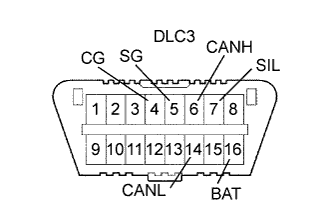
| DLC3 (Data Link Connector 3) |
Check DLC3 (Click here).
| INSPECT BATTERY VOLTAGE |
- Standard voltage:
- 11 to 14 V
| CHECK MIL |
Check that the MIL illuminates when turning the ignition switch on (IG).
If the MIL does not illuminate, there is a problem in the MIL circuit (Click here).When the engine is started, the MIL should turn off.
| ALL READINESS |
- HINT:
- With "All Readiness" you can check whether or not the DTC judgment has been completed by using the intelligent tester.
- You should check "All Readiness" after simulating malfunction symptoms or for validation after finishing repairs.
- With "All Readiness" you can check whether or not the DTC judgment has been completed by using the intelligent tester.
Connect the intelligent tester to the DLC3.
Turn the ignition switch ON.
Turn the tester ON.
Clear the DTCs (Click here).
Perform the DC judgment driving pattern to run the DTC judgment.
Select the following menu items: Powertrain / Engine and ECT / Utility / All Readiness.
Input the DTCs to be confirmed.
Check the DTC judgment result.
Result Tester Display
Description
NORMAL
- DTC judgment completed
- System normal
ABNORMAL
- DTC judgment completed
- System abnormal
INCOMPLETE
- DTC judgment not completed
- You should perform driving pattern after confirming DTC enabling conditions
UNKNOWN
- Unable to perform DTC judgment
- Number of DTCs which do not fulfill DTC preconditions has reached ECU's memory limit
- DTC judgment completed