All Door Entry Lock/Unlock Functions do not Operate, but Wireless Functions Operate
Circuit diagnosis · Vehicles built Aug 2008 – Jun 2010
Versions by build date: May 2007 – Jul 2008 Aug 2008 – Jun 2010 from Jul 2010
DESCRIPTION
When the wireless operation can be used to lock and unlock the doors, the communication line between the door control receiver and certification ECU (smart key ECU assembly) is normal. When the entry functions do not operate, one of the following may be the cause: 1) entry cancel function is set through customization; 2) malfunction in smart entry and start system communication line (electrical key transmitter and vehicle); or 3) wave interference.INSPECTION PROCEDURE
- NOTICE:
- Before performing the inspection, check that there are no problems related to "CAN COMMUNICATION SYSTEM" and "LIN COMMUNICATION SYSTEM".
| 1. READ VALUE ON INTELLIGENT TESTER (ENTRY CANCEL FUNCTION) |

Connect the intelligent tester to the DLC3.
Turn the engine switch on (IG).
Turn the tester on.
Select Entry Cancel SW in the Data List and read the tester display.
Entry & Start (Certification ECU (Smart Key ECU Assembly)): Tester Display
Measurement Item/Range
Normal Condition
Diagnostic Note
Entry Cancel SW
Entry function cancel / ON or OFF
Mode status is displayed
-
- Result:
Result
Proceed to
Entry function is ON
A
Entry function is OFF
B
|
|
||||

| B | |
 |
| 2. CHECK WAVE ENVIRONMENT |
Move the electrical key transmitter as described below and perform the operation inspection.
- HINT:
- When the electrical key transmitter is brought near the door outside handle or electrical key antenna, the possibility of wave interference decreases, and it can be determined if wave interference is causing the problem symptom.
- The transmitting waves of the wireless functions and entry functions are the same, but the wave logic is different. Therefore, it is possible that only the wireless functions or only the entry functions are affected by wave interference.
- When the electrical key transmitter is brought near the door outside handle or electrical key antenna, the possibility of wave interference decreases, and it can be determined if wave interference is causing the problem symptom.
Bring the electrical key transmitter near the driver door outside handle, and perform a front driver door entry lock and unlock operation check.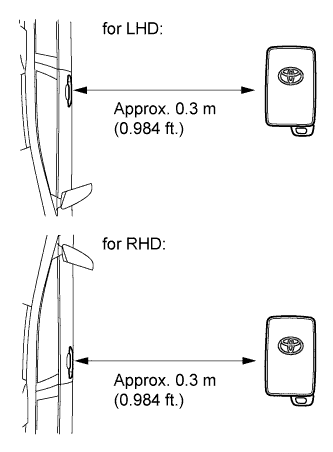

- NOTICE:
- If the key is brought within 0.2 m (0.656 ft.) of the door outside handle, communication is not possible.
Bring the electrical key transmitter near the front passenger door outside handle, and perform a front passenger door entry lock and unlock operation check.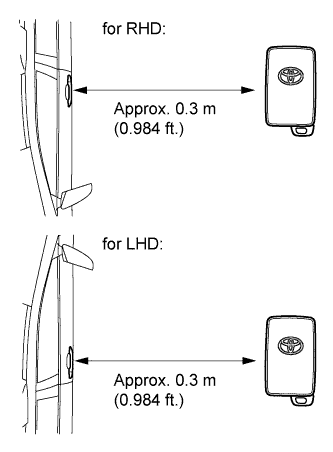
- NOTICE:
- If the key is brought within 0.2 m (0.656 ft.) of the door outside handle, communication is not possible.
Bring the electrical key transmitter near the outside electrical key oscillator (back door), and perform an entry back door open and lock functions check.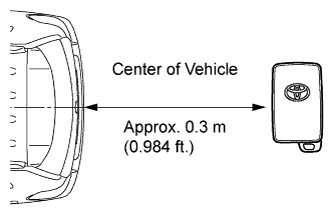
- NOTICE:
- If the key is brought within 0.2 m (0.656 ft.) of the rear bumper, communication is not possible.
- HINT:
- If the inspection result is that the problem only occurs in certain locations or times of day, the possibility of wave interference is high. Also, added vehicle components may cause wave interference. If installed, remove them and perform the operation check.
- Result:
Result
Proceed to
Some operation checks are normal
A
All operation checks fail
B
|
|
||||
| B | |
|
| 3. PERFORM KEY DIAGNOSTIC MODE INSPECTION |
Diagnostic mode inspection (driver door outside handle oscillator)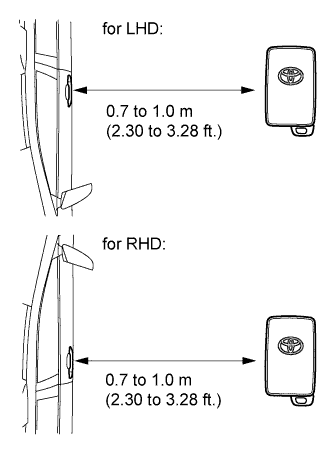
Connect the intelligent tester to the DLC3.
Turn the engine switch on (IG).
Turn the tester on.
Enter the following menus:Body / Entry & Start / Key Communication Check / Overhead + Driver Side.
When the electrical key transmitter is in the position shown in the illustration, check that the wireless door lock buzzer sounds.
Diagnostic mode inspection (front passenger door outside handle oscillator)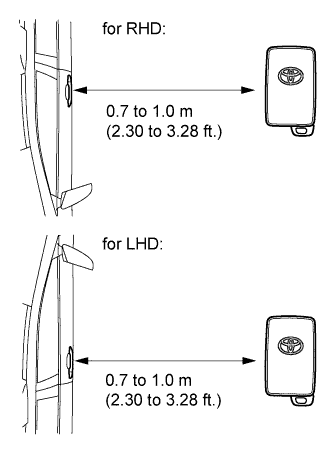
Connect the intelligent tester to the DLC3.
Turn the engine switch on (IG).
Turn the tester on.
Enter the following menus:Body / Entry & Start / Key Communication Check / Overhead + Passenger Side.
When the electrical key transmitter is in the position shown in the illustration, check that the wireless door lock buzzer sounds.
Diagnostic mode inspection (indoor electrical key oscillator (front))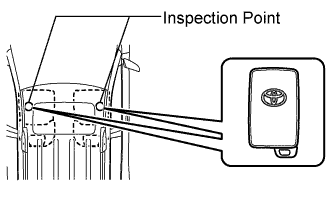
Connect the intelligent tester to the DLC3.
Turn the engine switch on (IG).
Turn the tester on.
Enter the following menus:Body / Entry & Start / Key Communication Check / Overhead + Front Room.
When the electrical key transmitter is in the position shown in the illustration, check that the wireless door lock buzzer sounds.
Diagnostic mode inspection (indoor electrical key oscillator (rear))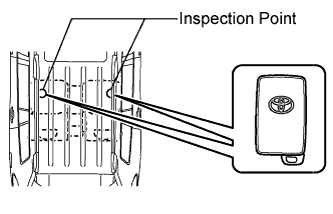
Connect the intelligent tester to the DLC3.
Turn the engine switch on (IG).
Turn the tester on.
Enter the following menus:Body / Entry & Start / Key Communication Check / Overhead + Rear Room.
When the electrical key transmitter is in the position shown in the illustration, check that the wireless door lock buzzer sounds.
Diagnostic mode inspection (indoor electrical key oscillator (luggage compartment))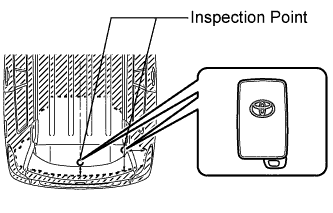
Connect the intelligent tester to the DLC3.
Turn the engine switch on (IG).
Turn the tester on.
Enter the following menus:Body / Entry & Start / Key Communication Check / Overhead + Back Door (inside).
When the electrical key transmitter is held at the same height as the rear bumper upper surface and aligned with the center of the rear of the vehicle, check that the wireless door lock buzzer sounds.
Diagnostic mode inspection (outside electrical key oscillator (back door))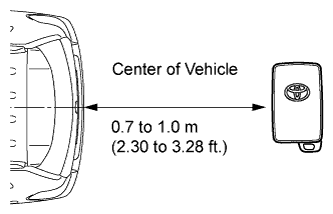
Connect the intelligent tester to the DLC3.
Turn the engine switch on (IG).
Turn the tester on.
Enter the following menus:Body / Entry & Start / Key Communication Check / Overhead + Back Door.
When the electrical key transmitter is in the position shown in the illustration, check that the wireless door lock buzzer sounds.
- Result:
Result
Proceed to
Some diagnostic mode inspections fail (door)
A
Some diagnostic mode inspections fail (interior)
B
Some diagnostic mode inspections fail (back door)
C
All diagnostic mode inspections are normal
D
All diagnostic mode inspections fail
E
|
|
||||
|
|
||||
|
|
||||
|
|
||||
| E | |
|
| 4. REPLACE ELECTRICAL KEY TRANSMITTER |
Replace the electrical key transmitter.
| NEXT | |
|
| 5. REGISTER ELECTRICAL KEY TRANSMITTER |
Register the electrical key transmitter.
| NEXT | |
|
| 6. CHECK ELECTRICAL KEY TRANSMITTER (OPERATION) |
Check that the entry functions operate normally.
- OK:
- Entry functions operate normally.
|
|
||||
| OK | ||
 |
||
| ||