Check for DTCs.
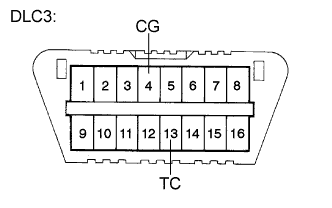
Using SST, connect terminals TC and CG of the DLC3.
- SST
- 09843-18040
Turn the ignition switch on (IG).
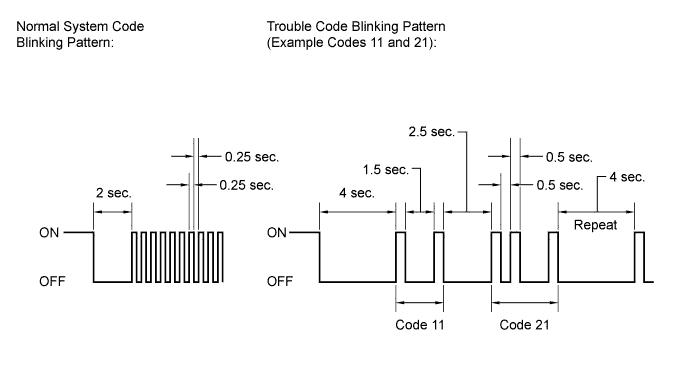
Observe the blinking pattern of the ABS warning and slip indicator lights in order to identify the DTC.
- HINT:
- If no code appears, inspect the TC and CG terminal circuit, and ABS warning and slip indicator light circuits.
Trouble Area See procedure TC and CG terminal circuit Click here ABS warning light circuit (Remains on) Click here ABS warning light circuit (Does not come on) Click here Slip indicator light circuit (Remains on) Click here Slip indicator light circuit (Does not come on) Click here As an example, the illustration below shows the blinking patterns of the normal system code and trouble codes 11 and 21 for the ABS warning and slip indicator lights.
Check the details of the DTCs.
DTC chart for ABS: Warning Light Display Techstream Display 11 C0278 12 C0279 13 C0273 14 C0274 21 C0226 22 C0236 23 C0246 24 C0256 25 C1225 31 C1401 C1405 32 C1402 C1406 33 C1403 C1407 34 C1404 C1408 35 C1413 36 C1414 37 C1337 38 C1415 39 C1416 41 C1241 C1417 43 C1243 44 C1419 C1420 C1442 45 C1245 46 C1421 C1422 C1423 C1424 49 C1425 C1426 51 C1427 C1428 67 C1429 C1430 C1431 91 C1361 94 U0073 95 U0124 97 C1381
(*1): This DTC is output when the VSC system detects a malfunction in the ABS.DTC chart for VSC: Indicator Light Display Techstream Display 31 C1432 C1433 C1434 32 C1232 34 C1435 C1436 C1443 36 C1210 39 C1336 43 (*1) - 51 C1201 53 C1203 62 U0123 63 U0126 64 C1380 65 C1437 U0100 66 C1290 C1439 C1445 98 C1440 C1441 After completing the check, disconnect terminals TC and CG of the DLC3 to turn off the display.
If 2 or more DTCs are detected at the same time, the DTCs will be displayed in ascending order.
 |
Clear the DTCs.
Using SST, connect terminals TC and CG of the DLC3.
- SST
- 09843-18040
Turn the ignition switch on (IG).
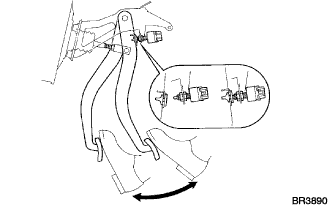
Clear the DTCs stored in the ECU by depressing the brake pedal 8 times or more within 5 seconds.
Check that the warning light indicates a normal system code.
Remove SST from the terminals of the DLC3.
- HINT:
- Clearing the DTCs cannot be performed by disconnecting the battery terminal or the ECU-IG NO. 2 fuse.
|
 |