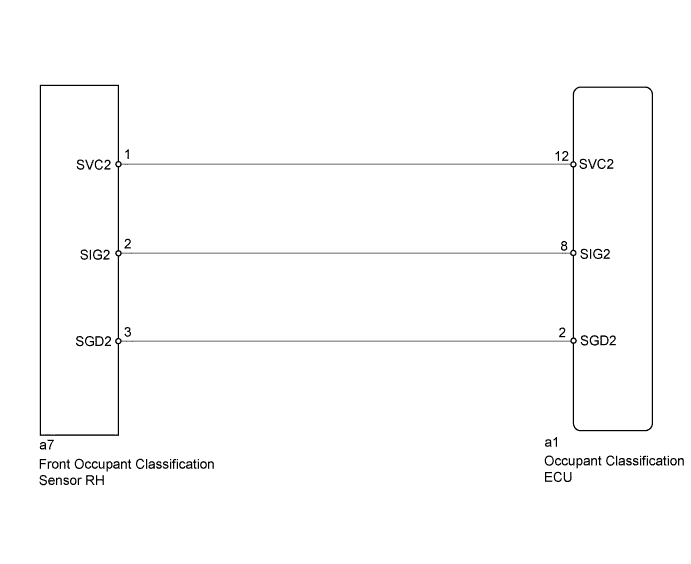
DTC B1781 Front Occupant Classification Sensor RH Circuit Malfunction |
| DTC No. | DTC Detection Condition | Trouble Area |
| B1781 |
|
|
| 1.CHECK CONNECTORS |
Turn the power switch off.
Disconnect the negative (-) terminal cable from the battery.
Check that the connectors are properly connected to the occupant classification ECU and the front occupant classification sensor RH.
Disconnect the connectors from the occupant classification ECU and the front occupant classification sensor RH.
Check that the terminals of the connectors are not damaged.
|
| ||||
| OK | |
 |
| 2.CHECK FRONT SEAT WIRE RH (SHORT TO B+) |
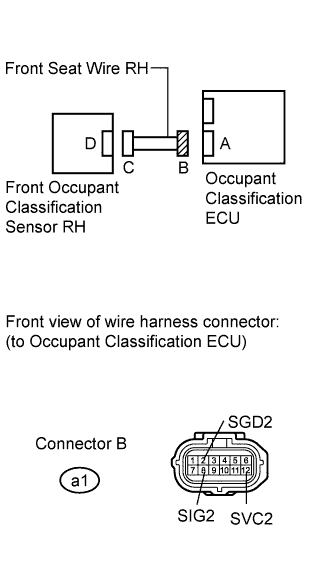 |
Connect the negative (-) terminal cable to the battery.
Turn the power switch on (IG).
Measure the voltage according to the value(s) in the table below.
| Tester Connection | Switch Condition | Specified Condition |
| a1-2 (SGD2) - Body ground | power switch on (IG) | Below 1 V |
| a1-8 (SIG2) - Body ground | power switch on (IG) | Below 1 V |
| a1-12 (SVC2) - Body ground | power switch on (IG) | Below 1 V |
|
| ||||
| OK | |
|
| 3.CHECK FRONT SEAT WIRE RH (OPEN) |
Turn the power switch off.
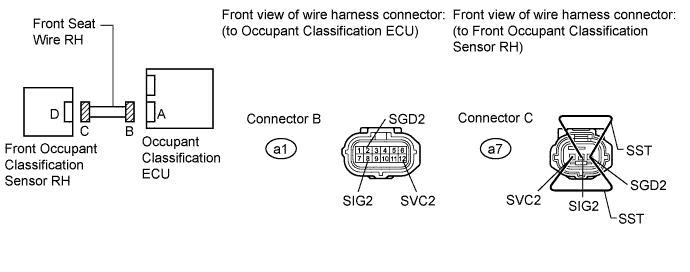
Disconnect the negative (-) terminal cable from the battery.
Using SST, connect terminals 1 (SVC2) and 3 (SGD2), and connect terminals 2 (SIG2) and 3 (SGD2) of connector C.
Measure the resistance according to the value(s) in the table below.
| Tester Connection | Switch Condition | Specified Condition |
| a1-8 (SIG2) - a1-2 (SGD2) | Always | Below 1 Ω |
| a1-12 (SVC2) - a1-2 (SGD2) | Always | Below 1 Ω |
|
| ||||
| OK | |
|
| 4.CHECK FRONT SEAT WIRE RH (SHORT) |
|
Disconnect SST from connector C.
Measure the resistance according to the value(s) in the table below.
| Tester Connection | Switch Condition | Specified Condition |
| a1-8 (SIG2) - a1-2 (SGD2) | Always | 1 MΩ or higher |
| a1-12 (SVC2) - a1-2 (SGD2) | Always | 1 MΩ or higher |
| a1-8 (SIG2) - a1-12 (SVC2) | Always | 1 MΩ or higher |
|
| ||||
| OK | |
|
| 5.CHECK FRONT SEAT WIRE RH (SHORT TO GROUND) |
|
Measure the resistance according to the value(s) in the table below.
| Tester Connection | Switch Condition | Specified Condition |
| a1-2 (SGD2) - Body ground | Always | 1 MΩ or higher |
| a1-8 (SIG2) - Body ground | Always | 1 MΩ or higher |
| a1-12 (SVC2) - Body ground | Always | 1 MΩ or higher |
|
| ||||
| OK | |
|
| 6.CHECK DTC |
Connect the connectors to the occupant classification ECU and the front occupant classification sensor RH.
Connect the negative (-) terminal cable to the battery.
Turn the power switch on (IG).
Clear the DTCs stored in the occupant classification ECU (Click here).
Clear the DTCs stored in the center airbag sensor assembly (Click here).
Turn the power switch off.
Turn the power switch on (IG).
Check for DTCs (Click here).
|
| ||||
| OK | ||
 | ||
| ||
| 7.REPLACE OCCUPANT CLASSIFICATION ECU |
Turn the power switch off.
Disconnect the negative (-) terminal cable from the battery.
Replace the occupant classification ECU (Click here).
| NEXT | |
|
| 8.PERFORM ZERO POINT CALIBRATION |
Connect the negative (-) terminal cable to the battery.
Connect Techstream to the DLC3.
Turn the power switch on (IG).
Using Techstream, perform "zero point calibration" (Click here).
|
| ||||
| OK | |
|
| 9.PERFORM SENSITIVITY CHECK |
Using Techstream, perform "sensitivity check" (Click here).
|
| ||||
| OK | |
|
| 10.CHECK DTC |
Turn the power switch on (IG).
Clear the DTCs stored in the occupant classification ECU (Click here).
Clear the DTCs stored in the center airbag sensor assembly (Click here).
Turn the power switch off.
Turn the power switch on (IG).
Check for DTCs (Click here).
|
| ||||
| OK | ||
| ||
| ||
| 11.REPLACE FRONT SEAT ASSEMBLY RH |
Turn the power switch off.
Disconnect the negative (-) terminal cable from the battery.
Replace the front seat assembly RH (Click here for power seat or Click here for manual seat).
| NEXT | |
|
| 12.PERFORM ZERO POINT CALIBRATION |
Connect the negative (-) terminal cable to the battery.
Connect Techstream to the DLC3.
Turn the power switch on (IG).
Using Techstream, perform "zero point calibration" (Click here).
| NEXT | |
|
| 13.PERFORM SENSITIVITY CHECK |
Using Techstream, perform "sensitivity check" (Click here).
| NEXT | ||
| ||
| ||

