AUDIO AND VISUAL SYSTEM (for Radio and Display Type) > Illumination for Panel Switch does not Come on with Tail Switch ON |
| 1.CHECK VEHICLE SIGNAL |
|
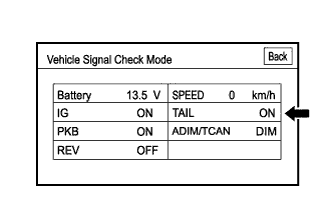
Enter the "Function Check/Setting I" and select "Vehicle Signal" (Click here).
Check that the display changes between ON and OFF according to the light control switch operation.
| Light Control Switch Condition | Display |
| TAIL or HEAD | ON |
| OFF | OFF |
|
| ||||
| OK | ||
 | ||
| ||
