NAVIGATION / MULTI INFO DISPLAY NAVIGATION RECEIVER REMOVAL
CAUTION / NOTICE / HINT
- CAUTION:
-
-
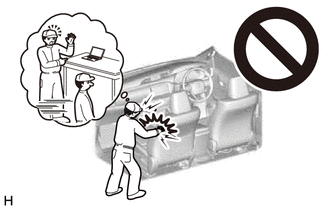
Some of these service operations affect the SRS airbag system. Read the precautionary notices concerning the SRS airbag system before servicing.
-
Click hereVehicle Interior>SUPPLEMENTAL RESTRAINT SYSTEMS>AIRBAG SYSTEM(for Type B)>PRECAUTION
- HINT:
- ·
Use the same procedure for RHD and LHD vehicles.
·The procedure listed below is for LHD vehicles.
PROCEDURE

 1. PRECAUTION
- NOTICE:
-
After turning the ignition switch off, waiting time may be required before disconnecting the cable from the battery terminal. Therefore, make sure to read the disconnecting the cable from the battery terminal notice before proceeding with work (See page General>INTRODUCTION>REPAIR INSTRUCTION>PRECAUTION).
2.DISCONNECT CABLE FROM NEGATIVE BATTERY TERMINAL
- NOTICE:
-
When disconnecting the cable, some systems need to be initialized after the cable is reconnected (See page General>INTRODUCTION>REPAIR INSTRUCTION>INITIALIZATION).
45100
3.REMOVE STEERING WHEEL ASSEMBLY
55470
4.REMOVE INSTRUMENT CLUSTER FINISH PANEL GARNISH ASSEMBLY
55041B
5.REMOVE NO. 1 INSTRUMENT PANEL BOX DOOR SUB-ASSEMBLY
55410C
6.REMOVE INSTRUMENT CLUSTER FINISH PANEL ASSEMBLY
55905J
7.REMOVE CONTROL KNOB SUB-ASSEMBLY (for Manual Air Conditioning System)
55918A
8.REMOVE AIR INLET DAMPER CONTROL LEVER (for Manual Air Conditioning System)
84013A
9.REMOVE INTEGRATION PANEL SUB-ASSEMBLY WITH AIR CONDITIONING CONTROL ASSEMBLY (for Manual Air Conditioning System)
55906A
10.DISCONNECT DEFROSTER DAMPER CONTROL CABLE SUB-ASSEMBLY (for Manual Air Conditioning System)
55908A
11.DISCONNECT AIR INLET DAMPER CONTROL CABLE SUB-ASSEMBLY (for Manual Air Conditioning System)
55909A
12.DISCONNECT AIR MIX DAMPER CONTROL CABLE SUB-ASSEMBLY (for Manual Air Conditioning System)
55900
13.REMOVE AIR CONDITIONING CONTROL ASSEMBLY (for Automatic Air Conditioning System)
86120L
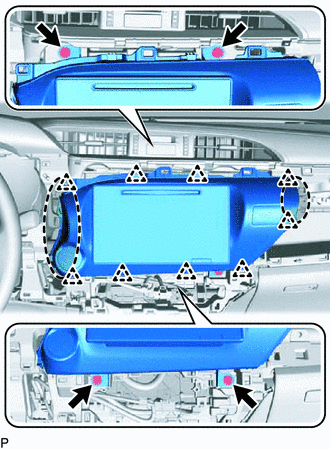
14.REMOVE NAVIGATION RECEIVER ASSEMBLY WITH BRACKET

|
Place Hands Here |
Remove the 4 screws.
Pull out the navigation receiver assembly to detach the clips on the backside of the navigation receiver assembly with bracket.
Disconnect all the connectors and remove the navigation receiver assembly with bracket.
86211
15.REMOVE NO. 1 RADIO BRACKET
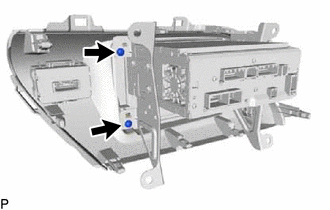
Remove the 2 screws.
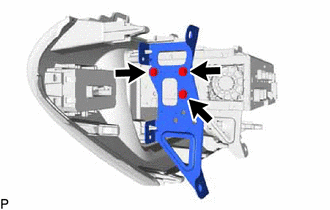
Remove the 3 screws and No. 1 radio bracket from the navigation receiver assembly.
86212
16.REMOVE NO. 2 RADIO BRACKET
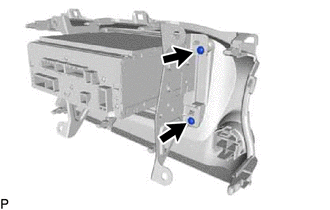
Remove the 2 screws.
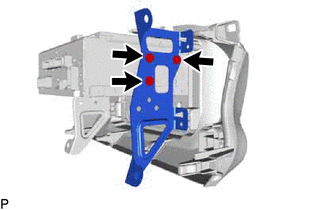
Remove the 3 screws and No. 2 radio bracket from the navigation receiver assembly.
86120L
17.REMOVE NAVIGATION RECEIVER ASSEMBLY
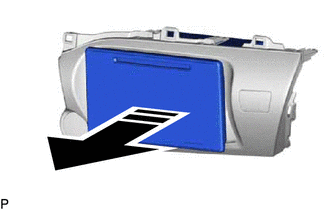

|
Remove in this Direction |
Remove the navigation receiver assembly in the direction of the arrow shown in the illustration.