NAVIGATION / MULTI INFO DISPLAY NAVIGATION RECEIVER INSTALLATION
CAUTION / NOTICE / HINT
PROCEDURE

 86120L
1.INSTALL NAVIGATION RECEIVER ASSEMBLY
86212
2.INSTALL NO. 2 RADIO BRACKET
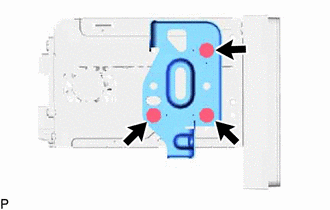
Install the No. 2 radio bracket to the navigation receiver assembly with the 3 screws.
86211
3.INSTALL NO. 1 RADIO BRACKET
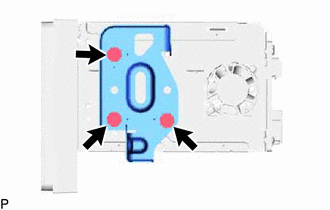
Install the No. 1 radio bracket to the navigation receiver assembly with the 3 screws.
86120L
4.INSTALL NAVIGATION RECEIVER ASSEMBLY WITH BRACKET
Connect all the connectors.
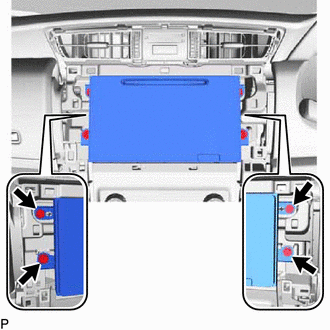
Insert the navigation receiver assembly with bracket.
- NOTICE:
-
When inserting the navigation receiver assembly, do not press the knobs on it.
Install the navigation receiver assembly with bracket with the 4 screws.
55405B
5.INSTALL CENTER INSTRUMENT CLUSTER FINISH PANEL SUB-ASSEMBLY
55011A
6.INSTALL NO. 1 INSTRUMENT PANEL GARNISH SUB-ASSEMBLY
55012A
7.INSTALL NO. 2 INSTRUMENT PANEL GARNISH SUB-ASSEMBLY
55667
8.INSTALL INSTRUMENT PANEL REGISTER BEZEL GARNISH
9.CONNECT CABLE TO NEGATIVE BATTERY TERMINAL
- NOTICE:
-
When disconnecting the cable, some systems need to be initialized after the cable is reconnected (See page General>INTRODUCTION>REPAIR INSTRUCTION>INITIALIZATION).