RM1880E
_56
Audio / Visual / Telematics
_013234
AUDIO / VIDEO
_0068594
AUDIO AND VISUAL SYSTEM(for Radio and Display Type)
J
AUDIO / VIDEO AUDIO AND VISUAL SYSTEM(for Radio and Display Type) Display does not Dim when Light Control Switch is Turned ON
CAUTION / NOTICE / HINT
- HINT:
-
For vehicles equipped with an Extension Module, refer to optional equipment's manuals.
PROCEDURE
1.CHECK VEHICLE SIGNAL
a.
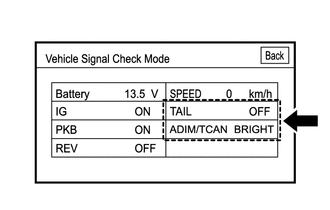
Enter the "Function Check/Setting I" and select "Vehicle Signal".
b.
Check that the display for "TAIL" changes between ON and OFF according to the light control switch operation.
- OK:
Light Control Switch Condition Display TAIL or HEAD ON OFF OFF
c.
Check that the display for "ADIM/TCAN" changes between DIM and BRIGHT according to the light control switch operation.
- OK:
Light Control Switch Condition Display TAIL or HEAD DIM OFF BRIGHT
- HINT:
-
The display is updated once per second. As a result, it is normal for the display to lag behind the actual switch operation.
- Result:
Proceed to OK NG
OK
REPLACE RADIO AND DISPLAY RECEIVER ASSEMBLY
NG
PROCEED TO NEXT SUSPECTED AREA SHOWN IN PROBLEM SYMPTOMS TABLE