B157D DAB Tuner Antenna Disconnected
Diagnostic trouble codes · Vehicles built Aug 2013 – Jul 2014
Versions by build date: Aug 2013 – Jul 2014 from Aug 2014
DESCRIPTION
This DTC is stored when a malfunction occurs in the digital audio broadcasting antenna assembly which is connected to the navigation receiver assembly.| DTC Code |
DTC Detection Condition |
Trouble Area |
| B157D |
The digital audio broadcasting antenna assembly is not connected |
|
WIRING DIAGRAM
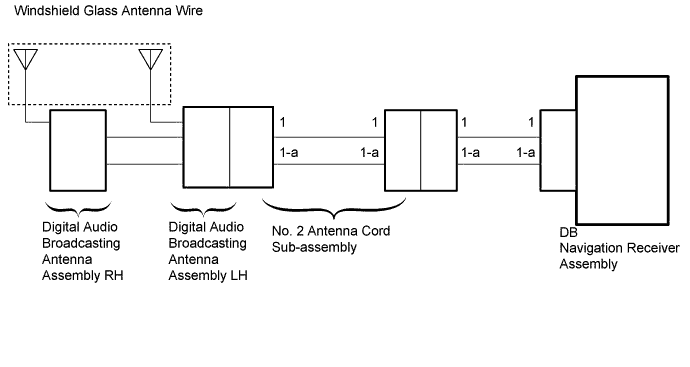

INSPECTION PROCEDURE
- HINT:
- When replacing the navigation receiver assembly, it is necessary to perform the vehicle contract setting for Connected Services (w/ Connected Services Function).
| 1. CHECK FOR DTC |

Clear the DTCs (Click here).
Check for DTCs (Click here).
- OK:
- No DTCs are output.
|
|
||||

| OK | ||
 |
||
| ||
| 2. CHECK OPTIONAL COMPONENTS |
Check if any optional components that may decrease reception capacity, such as sunshade film or a telephone antenna, are installed.
- OK:
- Optional components are installed.
- NOTICE:
- Do not remove optional components without permission of the customer.
|
|
||||
| OK | ||
|
||
| ||
| 3. INSPECT WINDSHIELD GLASS ANTENNA WIRE |
Inspect the windshield glass antenna wire (Click here).
|
|
||||

| OK | |
 |
| 4. CHECK NAVIGATION RECEIVER ASSEMBLY |
Remove the antenna connector from the navigation receiver assembly.
Turn the engine switch on (ACC) with the navigation receiver assembly connector connected.
Turn on the radio and turn into AM mode.
Place a screwdriver, thin wire or other metal object on the navigation receiver assembly antenna jack and check that noise can be heard from the speakers.
- OK:
- Noise occurs.
|
|
||||
| OK | |
|
| 5. CHECK HARNESS AND CONNECTOR (NAVIGATION RECEIVER ASSEMBLY - NO. 2 ANTENNA CORD SUB-ASSEMBLY) |
Disconnect the DB navigation receiver assembly connector.
Disconnect the antenna connector from the No.2 antenna cord sub-assembly.
Measure the resistance according to the value(s) in the table below.
- Standard Resistance:
Tester Connection
Condition
Specified Condition
1 - 1
Always
Below 1 Ω
1-a - 1-a
Always
Below 1 Ω
1 - Body ground
Always
10 kΩ or higher
1-a - Body ground
Always
10 kΩ or higher
|
|
||||
| OK | |
|
| 6. CHECK NO. 2 ANTENNA CORD SUB-ASSEMBLY |
Disconnect the antenna connector from the navigation receiver assembly.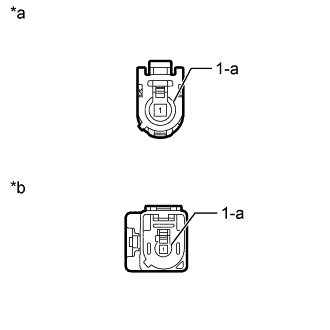
Disconnect the antenna connector from the digital audio broadcasting antenna assembly LH.
Measure the resistance according to the value(s) in the table below.
- Standard Resistance:
Tester Connection
Condition
Specified Condition
1 - 1
Always
Below 1 Ω
1-a - 1-a
Always
Below 1 Ω
1 - Body ground
Always
10 kΩ or higher
1-a - Body ground
Always
10 kΩ or higher
Text in Illustration *a
Front view of wire harness connector
(to Digital Audio Broadcasting Antenna Assembly LH)
*b
Front view of wire harness connector
(to Vehicle Wire Harness)
|
|
||||
| OK | |
|
| 7. CHECK DIGITAL AUDIO BROADCASTING ANTENNA ASSEMBLY LH |
Replace the digital audio broadcasting antenna assembly LH with a known good one (Click here).
Clear the DTCs (Click here).
Check for DTCs (Click here).
- OK:
- No DTCs are output.
|
|
||||
| OK | ||
|
||
| ||
| 8. CHECK DIGITAL AUDIO BROADCASTING ANTENNA ASSEMBLY RH |
Replace the digital audio broadcasting antenna assembly RH with a known good one (Click here ).
Clear the DTCs (Click here).
Check for DTCs (Click here).
- OK:
- No DTCs are output.
|
|
||||
| OK | ||
|
||
| ||