AUDIO / VIDEO AMPLIFIER ANTENNA INSTALLATION
PROCEDURE

 86300
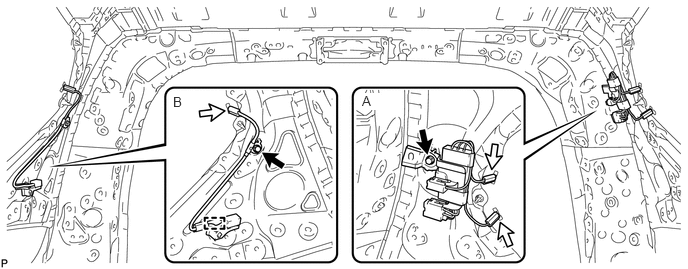
1.INSTALL HOLDER ANTENNA ASSEMBLY (for 5 Door)
for Diversity:
Install the holder antenna with the bolt as shown in the part of the illustration labeled A.
- Torque:
- 7.0 N*m (71 kgf*cm, 62 in.*lbf)
Attach the clamp and install the holder antenna with the bolt as shown in the part of the illustration labeled B.
- Torque:
- 7.5 N*m (76 kgf*cm, 66 in.*lbf)
Connect the 3 connectors.
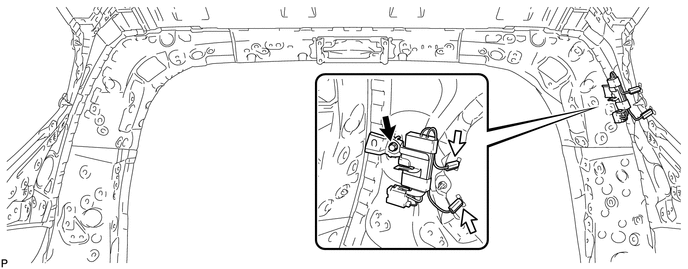
for Non Diversity:
Install the holder antenna with the bolt.
- Torque:
- 7.0 N*m (71 kgf*cm, 62 in.*lbf)
Connect the 2 connectors.
86300
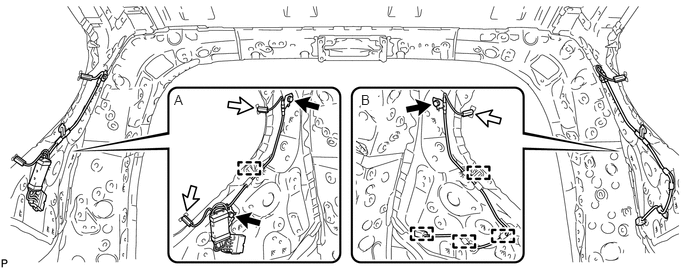
2.INSTALL HOLDER ANTENNA ASSEMBLY (for 3 Door)
for Diversity:
Attach the clamp and install the holder antenna with the 2 bolts as shown in the part of the illustration labeled A.
- Torque:
- 8.0 N*m (82 kgf*cm, 71 in.*lbf)
Attach the 4 clamps and install the holder antenna with the bolt as shown in the part of the illustration labeled B.
- Torque:
- 7.5 N*m (76 kgf*cm, 66 in.*lbf)
Connect the 3 connectors.
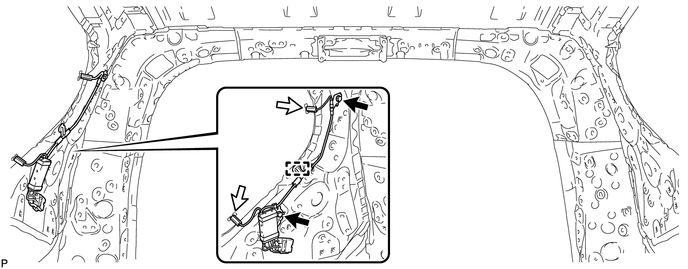
for Non Diversity:
Attach the clamp and install the holder antenna with the 2 bolts.
- Torque:
- 8.0 N*m (82 kgf*cm, 71 in.*lbf)
Connect the 2 connectors.
63310
3.INSTALL ROOF HEADLINING ASSEMBLY
for 5 Door:
(See page Vehicle Interior>INTERIOR PANELS / TRIM>ROOF HEADLINING (for 5 Door)>INSTALLATION)
for 3 Door:
(See page Vehicle Interior>INTERIOR PANELS / TRIM>ROOF HEADLINING (for 3 Door)>INSTALLATION)
4.CONNECT CABLE TO NEGATIVE BATTERY TERMINAL
- NOTICE:
-
When disconnecting the cable, some systems need to be initialized after the cable is reconnected (See page General>INTRODUCTION>REPAIR INSTRUCTION>INITIALIZATION).