AUDIO / VIDEO RADIO RECEIVER(for Radio and Display Type) INSTALLATION
CAUTION / NOTICE / HINT
- HINT:
- ·
Use the same procedure for RHD and LHD vehicles.
·The procedure listed below is for LHD vehicles.
PROCEDURE

 55670A
1.INSTALL CENTER INSTRUMENT PANEL REGISTER ASSEMBLY
86212C
2.INSTALL NO. 2 RADIO RECEIVER BRACKET
Install the No. 2 radio receiver bracket with the 3 screws.
- Torque:
- 3.0 N*m (31 kgf*cm, 27 in.*lbf)
86211J
3.INSTALL NO. 1 RADIO RECEIVER BRACKET
Install the No. 1 radio receiver bracket with the 3 screws.
- Torque:
- 3.0 N*m (31 kgf*cm, 27 in.*lbf)
86841
4.INSTALL NAVIGATION ECU (w/ Navigation System)
86140A
5.INSTALL RADIO AND DISPLAY RECEIVER ASSEMBLY
Connect each connector.
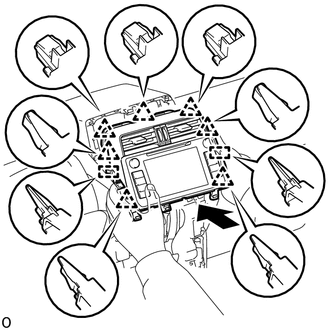
Insert the radio and display receiver assembly and attach the 2 guides, 7 clips on the backside of the radio and display receiver assembly.
- NOTICE:
-
When inserting the receiver, do not press the knobs on it.
Install the radio and display receiver assembly with the 4 bolts.
- Torque:
- 12 N*m (122 kgf*cm, 9 ft.*lbf)
84010A
6.INSTALL INTEGRATION CONTROL AND PANEL ASSEMBLY
7.CONNECT CABLE TO NEGATIVE BATTERY TERMINAL
- NOTICE:
-
When disconnecting the cable, some systems need to be initialized after the cable is reconnected.
-
Click hereGeneral>INTRODUCTION>REPAIR INSTRUCTION>INITIALIZATION