NAVIGATION / MULTI INFO DISPLAY NAVIGATION SYSTEM B153A GVIF Disconnected (from Extension Module to H/U)
DESCRIPTION
| DTC No. | Detection Item | DTC Detection Condition | Trouble Area |
|---|---|---|---|
| B153A | GVIF Disconnected (from Extension Module to H/U) | GVIF disconnected (from navigation ECU to radio and display receiver assembly) | ·
Navigation ECU ·
Radio and display receiver assembly ·
No. 1 navigation wire |
WIRING DIAGRAM
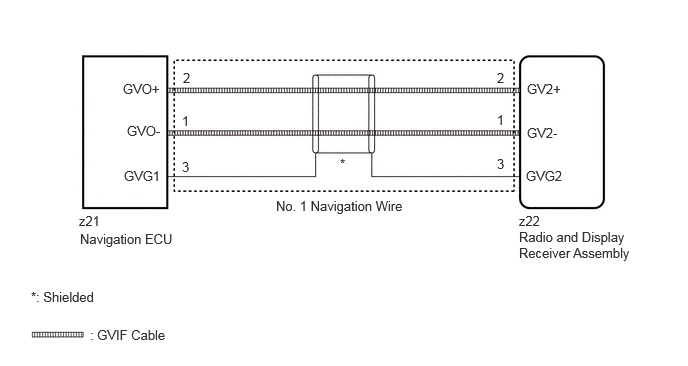
CAUTION / NOTICE / HINT
- HINT:
-
Depending on the parts that are replaced during vehicle inspection or maintenance, performing initialization, registration or calibration may be needed. Refer to Precaution for Navigation System.
-
Click hereAudio / Visual / Telematics>NAVIGATION / MULTI INFO DISPLAY>NAVIGATION SYSTEM>PRECAUTION
PROCEDURE
Clear the DTCs.
Click hereAudio / Visual / Telematics>NAVIGATION / MULTI INFO DISPLAY>NAVIGATION SYSTEM>DTC CHECK / CLEAR
Recheck for DTCs and check that no DTCs are output.
Click hereAudio / Visual / Telematics>NAVIGATION / MULTI INFO DISPLAY>NAVIGATION SYSTEM>DTC CHECK / CLEAR
- OK:
No DTCs are output.
- Result:
Proceed to OK NG
OK
Click hereGeneral>INTRODUCTION>HOW TO TROUBLESHOOT ECU CONTROLLED SYSTEMS>HOW TO PROCEED WITH TROUBLESHOOTING
NG
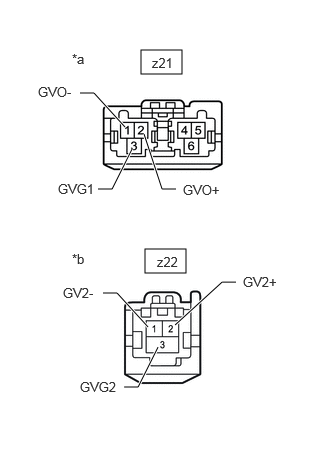
| *a | Front view of wire harness connector
(to Navigation ECU) |
| *b | Front view of wire harness connector
(to Radio and Display Receiver Assembly) |
Disconnect the z21 navigation ECU connector.
Disconnect the z22 radio and display receiver assembly connector.
Measure the resistance according to the value(s) in the table below.
- Standard Resistance:
Tester Connection Condition Specified Condition z21-1 (GVO-) - z22-1 (GV2-) Always Below 1 Ω z21-2 (GVO+) - z22-2 (GV2+) Always Below 1 Ω z21-3 (GVG1) - z22-3 (GVG2) Always Below 1 Ω
- Result:
Proceed to OK NG
OK
NG
Replace the navigation ECU with a new one.
Click hereAudio / Visual / Telematics>NAVIGATION / MULTI INFO DISPLAY>NAVIGATION ECU>REMOVAL
- Result:
Proceed to NEXT
NEXT
Clear the DTCs.
Click hereAudio / Visual / Telematics>NAVIGATION / MULTI INFO DISPLAY>NAVIGATION SYSTEM>DTC CHECK / CLEAR
Recheck for DTCs and check that no DTCs are output.
Click hereAudio / Visual / Telematics>NAVIGATION / MULTI INFO DISPLAY>NAVIGATION SYSTEM>DTC CHECK / CLEAR
- OK:
No DTCs are output.
- Result:
Proceed to OK NG
OK
NG
Click hereAudio / Visual / Telematics>AUDIO / VIDEO>RADIO RECEIVER (for Radio and Display Type)>REMOVAL