NAVIGATION / MULTI INFO DISPLAY NAVIGATION ANTENNA(w/o Heated Windshield Defroster System) REMOVAL
CAUTION / NOTICE / HINT
- HINT:
- ·
Use the same procedure for RHD and LHD vehicles.
·The procedure listed below is for LHD vehicles.
PROCEDURE

 1. PRECAUTION
- NOTICE:
-
After turning the ignition switch off, waiting time may be required before disconnecting the cable from the negative (-) battery terminal.
-
Click hereGeneral>INTRODUCTION>REPAIR INSTRUCTION>PRECAUTION
2.DISCONNECT CABLE FROM NEGATIVE BATTERY TERMINAL
55401E
3.REMOVE INSTRUMENT PANEL SAFETY PAD SUB-ASSEMBLY
55843A
4.REMOVE NO. 1 HEATER TO REGISTER DUCT
55844
5.REMOVE NO. 2 HEATER TO REGISTER DUCT
55971C
6.REMOVE NO. 1 SIDE DEFROSTER NOZZLE DUCT
55972C
7.REMOVE NO. 2 SIDE DEFROSTER NOZZLE DUCT
55950G
8.REMOVE DEFROSTER NOZZLE ASSEMBLY
86860
9.REMOVE NAVIGATION ANTENNA ASSEMBLY
w/o Telematics Transceiver:
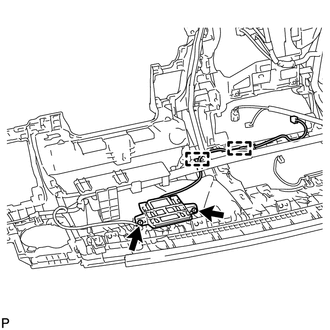
Detach the clamp.
Remove the 2 screws and navigation antenna assembly.
w/ Telematics Transceiver:
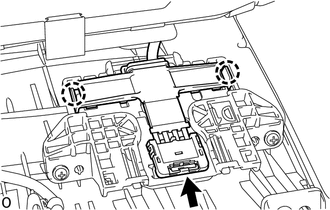
Disconnect the connector.
Detach the claw.
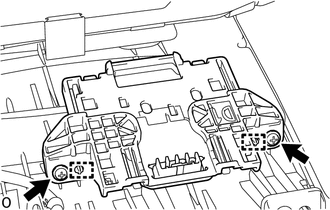
Remove the 2 screws.
Detach the guide and navigation antenna assembly with bracket.
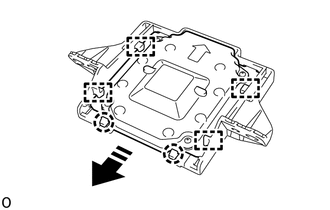

|
Remove in this Direction |
Detach the claw and guide and remove the navigation antenna assembly as shown in the illustration.