SYSTEM DESCRIPTION
Troubleshooting · Vehicles built Sep 2011 – Dec 2011
Versions by build date: Sep 2011 – Dec 2011 from Jan 2012
| DVD (Digital Versatile Disc) PLAYER OUTLINE (for DVD Changer Models) |
The DVD player can only play DVD videos, DVD audios and video CDs that have any of the following marks:
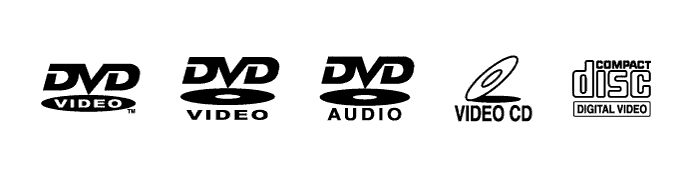

Precaution for use of discs
- NOTICE:
- PAL or SECAM color television standard discs cannot be played (only NTSC discs can be played).
- Keep the discs away from dirt. Be careful not to damage the discs or leave fingerprints on them.
- Hold discs by the outer edge and center hole with the label side up.
- Leaving the disc exposed halfway out of the slot for a long time after pressing the disc eject button may cause deformation of the disc, making the disc unusable.
- Do not use odd-shaped discs because these may cause player malfunctions.
- Do not use discs whose recording portion is transparent or translucent because they may not be inserted, ejected or played normally.
- DualDiscs that combine DVD recorded material on one side with CD digital audio material on the other cannot be played.
- PAL or SECAM color television standard discs cannot be played (only NTSC discs can be played).
| CD (Compact Disc) PLAYER OUTLINE |
A compact disc player uses a laser pickup to read digital signals recorded on a compact disc (CD). By converting the digital signals to analog, it can play music and audio.
- CAUTION:
- Do not look directly at the laser pickup because the CD player uses an invisible laser beam. Be sure to operate the player only as instructed.
- NOTICE:
- Do not disassemble any part of the CD player.
- Do not apply oil to the CD player.
- Do not insert anything but a CD into the CD player.
- Do not disassemble any part of the CD player.
Usable discs
This player can play only audio CDs, CD-Rs (CD-Recordable) and CD-RWs (CD-ReWritable) that have any of the following marks:
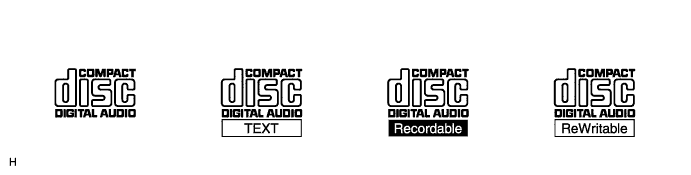
Precautions for use of discs
- NOTICE:
- Copy-protected CDs cannot be played.
- CD-Rs and CD-RWs may not be played depending on the recording conditions or characteristics of the discs, or due to damage, dirt or deterioration caused by leaving the discs in the cabin for a long time.
- Unfinalized CD-Rs and CD-RWs cannot be played.
- DualDiscs that combine DVD recorded material on one side with CD digital audio material on the other cannot be played.
- Keep the discs away from dirt. Be careful not to damage the discs or leave your fingerprints on them.
- Hold discs by the outer edge and center hole with the label side up.
- Leaving the disc exposed halfway out of the slot for a long time after pressing the disc eject button may cause deformation of the disc, making the disc unusable.
- If discs have adhesive tape, stickers, CD labels or any traces of such labels attached, the discs may not be ejected or player malfunctions may result.
- Keep the discs away from direct sunlight. (Exposure to direct sunlight may cause deformation of the disc, making the disc unusable.)
- Do not use odd-shaped CDs because these may cause player malfunctions.
- Do not use discs whose recording portion is transparent or translucent because they may not be inserted, ejected or played normally.
- Use only 4.7 in. (12 cm) CDs.
- Do not use 3 in. (8 cm) CDs, either with or without adoptois.
- Copy-protected CDs cannot be played.
- HINT:
- When it is cold or it is raining, if the windows mist up, mist and condensation may form in the player. In such cases, the CD sound may skip or stop in the middle of play. Ventilate or dehumidify the cabin for a while before using the player.
- The CD sound may skip if the player experiences strong vibrations when the vehicle is driven on rough roads or similar uneven surface(s).
- When it is cold or it is raining, if the windows mist up, mist and condensation may form in the player. In such cases, the CD sound may skip or stop in the middle of play. Ventilate or dehumidify the cabin for a while before using the player.
Cleaning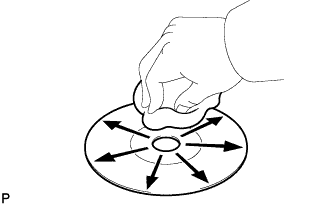
- NOTICE:
- Do not use a lens cleaner because it may cause a malfunction in the pickup portion of the player.
If dirt is on the disc surface, wipe it clean with a soft dry cloth such as an eyeglass cleaner for plastic lenses from the inside to the outside in a radial direction.
- NOTICE:
- Pressing on the disc by hand or rubbing the disc with a hard cloth may scratch the disc surface.
- Use of solvent such as a record spray, antistatic agent, alcohol, benzine and thinner or a chemical cloth may cause damage to the disc, making the disc unusable.
- Pressing on the disc by hand or rubbing the disc with a hard cloth may scratch the disc surface.
| MP3/WMA OUTLINE |
Playable MP3 file standards
Compatible standard
MP3 (MPEG1 LAYER3, MPEG2 LSF LAYER3)
Compatible sampling frequency
- MPEG1 LAYER3: 32, 44.1, 48 (kHz)
- MPEG2 LSF LAYER3: 16, 22.05, 24 (kHz)
Compatible bit rate
- MPEG1 LAYER3: 64, 80, 96, 112, 128, 160, 192, 224, 256, 320 (kbps)
- MPEG2 LSF LAYER3: 64, 80, 96, 112, 128, 144, 160 (kbps)
- Compatible with VBR
Compatible channel mode
Stereo, joint stereo, dual channel, monaural
- MPEG1 LAYER3: 32, 44.1, 48 (kHz)
Playable WMA file standards
Compatible standard
WMA Ver. 7, 8 and 9
Compatible sampling frequency
32, 44.1, 48 (kHz)
Compatible bit rate (Only compatible with 2-channel playback)
- Ver. 7, 8: CBR48, 64, 80, 96, 128, 160, 192 (kbps)
- Ver. 9: CBR48, 64, 80, 96, 128, 160, 192, 256, 320 (kbps)
- Ver. 7, 8: CBR48, 64, 80, 96, 128, 160, 192 (kbps)
ID3 tag and WMA tag
Additional textual information called ID3 tag can be input to MP3 files. Information such as song titles and artist names can be stored.
- HINT:
- This player is compatible with the ID3 tags of ID3 Ver. 1.0 and 1.1, and ID3 Ver. 2.2 and 2.3. (Number of characters complies with ID3 Ver. 1.0 and 1.1.)
Additional textual information called WMA tag can be input to WMA files. Information such as song titles and artist names can be stored.
Usable media
Only CD-ROMs, CD-Rs (CD-Recordable) and CD-RWs (CD-ReWritable) can be used to play MP3/WMA files.
- NOTICE:
- CD-Rs and CD-RWs are more easily affected by a hot and humid environment than discs used for normal audio CDs. For this reason, some CD-Rs and CD-RWs do not play.
- If there are fingerprints or scratches on a disc, the disc may not play or the CD sound may skip.
- Some CD-Rs and CD-RWs may deteriorate if they are left in the cabin for a long time.
- Keep CD-Rs and CD-RWs in an opaque case.
- CD-Rs and CD-RWs are more easily affected by a hot and humid environment than discs used for normal audio CDs. For this reason, some CD-Rs and CD-RWs do not play.
Usable media format
Usable media format
Disc format
CD-ROM Mode 1, CD-ROM XA Mode 2 Form1
File format
ISO9660 Level 1 and Level 2 (Joliet, Romeo)
- HINT:
- As for MP3/WMA files written in any unlisted format, the contents of the files may not be played normally or the file names or folder names may not be displayed correctly.
- This player is compatible with multi-session discs and can play CD-Rs and CD-RWs on which MP3/WMA files are added. However, only the first session can be played.
- Discs whose first session includes both music data and MP3 or WMA format data cannot be played.
- As for MP3/WMA files written in any unlisted format, the contents of the files may not be played normally or the file names or folder names may not be displayed correctly.
Standard and restrictions
Maximum directory levels
8 levels
Maximum number of characters for a folder name/file name
32 characters
Maximum number of folders
192 (Including empty folders, root folders, and folders that do not contain MP3/WMA files)
Maximum number of files in a disc
255 (Including non-MP3/WMA files)
File names
Only files with an extension of ".mp3" or ".wma" can be recognized and played as MP3 or WMA files.
Save MP3 or WMA files with an extension of ".mp3" or ".wma".
- NOTICE:
- If non-MP3 or non-WMA files are saved with an extension of ".mp3" or ".wma", those files may be wrongly recognized as MP3 or WMA files and played. A loud noise may occur and damage to the speakers may result.
| COMMUNICATION SYSTEM |
- HINT:
- Refer to Navigation System (for HDD) (Click here).
- Refer to Navigation System (for DVD) (Click here).
- Refer to Navigation System (for HDD) (Click here).
| DIAGNOSTIC FUNCTION OUTLINE |
The navigation system has a diagnostic function (the result is indicated on the master unit or the intelligent tester).
| DIAGNOSIS DISPLAY DETAILED DESCRIPTION (w/ Sound Library) |
- HINT:
- This section contains a detailed description of displays in diagnostic mode.
- Illustrations may differ from the actual vehicle screen depending on the device settings and options. Therefore, some detailed areas may not be shown exactly the same as on the actual vehicle screen.
- This section contains a detailed description of displays in diagnostic mode.
Function Check/Setting Screen
Sound Library Information Screen
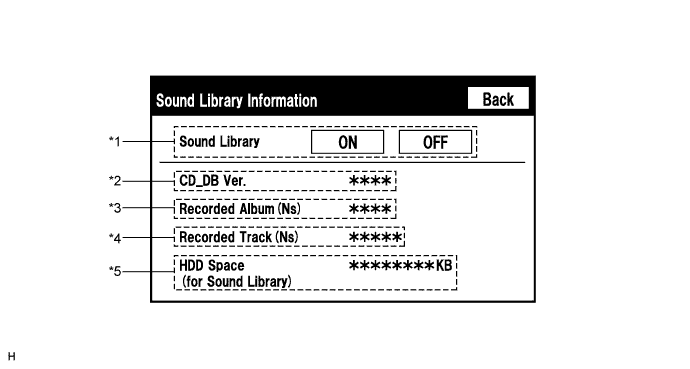
Screen Description Display
Content
*1: Recording function setting for HDD
Recording to HDD permitted (ON)/not permitted (OFF)
*2: Media database version
Media database version currently installed on HDD
*3: Number of albums
Number of albums recorded in HDD
*4: Number of tracks
Number of tracks recorded in HDD
*5: Free space in HDD
Free space in HDD partition for sound library
Refer to the following for detailed descriptions of the diagnosis display for items other than the sound library function:
- HINT:
- Refer to Navigation System (for HDD) (Click here).
| "BLUETOOTH" OUTLINE |
"Bluetooth" is a trademark owned by Bluetooth SIG. Inc.
"Bluetooth" is a wireless connection technology that uses the 2.4 GHz frequency band. This makes it possible to connect a cellular phone ("Bluetooth" compatible phone*1) to the radio receiver assembly (the "Bluetooth" system is built in), and use the hands-free function of the cellular phone, even if it is in a pocket or bag. As a result, it is not necessary to use a connector attached directly to the cellular phone.
*1: Some versions of "Bluetooth" compatible cellular phones may not function.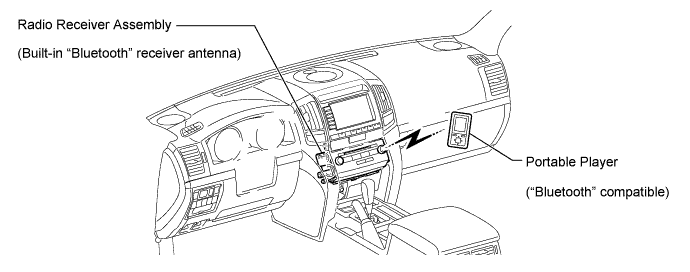
- HINT:
- The communication performance of "Bluetooth" may vary depending on obstructions or radio wave conditions between communication devices, electromagnetic radiation, communication device sensitivity or antenna capacity.
"Bluetooth" audio function (w/ Bluetooth Audio Function)
The "Bluetooth" built-in radio receiver assembly and a "Bluetooth" compatible portable audio player*2 can be connected using a "Bluetooth" wireless connection. This enables files stored in the portable audio player to be heard from the vehicle speakers. In addition, operations such as play/stop can be performed directly from the radio receiver assembly.
*2: Some versions of "Bluetooth" compatible audio players may not be able to operate the "Bluetooth" function, or music may play, but functions available using the radio receiver assembly may be limited.Available "Bluetooth" audio devices
"Bluetooth" specifications
Ver. 1.1 or higher (Recommended: Ver. 2.0+EDR or higher)
Following profiles
- A2DP (Advanced Audio Distribution Profile) Ver. 1.0 or higher
- AVRCP (Audio/Video Remote Control Profile) Ver. 1.0 or higher (Confirmed: Ver. 1.3 or higher)
Maximum number of audio devices that can be registered
2
- HINT:
- The amount of remaining battery charge displayed on the radio receiver assembly may be different from that of the portable player.
- A2DP (Advanced Audio Distribution Profile) Ver. 1.0 or higher
| USB AUDIO SYSTEM FUNCTION OUTLINE |
The No. 1 stereo jack adapter assembly is equipped with a USB terminal. Connecting a USB device or "iPod" to the No. 1 stereo jack adapter assembly allows music files to be played. Not only is it possible to play music from a USB device with audio functions, is also possible to play MP3 or WMA music files that are stored on a USB device. In addition, "iPod" control software is installed, allowing file selection from playlists and operation using shuffle mode.
- HINT:
- Visual contents of an "iPod" cannot be played.
- Operation through the controls of a USB device or "iPod" cannot be performed while it is connected.
- Visual contents of an "iPod" cannot be played.
USB audio system compatible model
USB Device
The following device formats can be used:
MP3 and WMA files written in any format other than those listed above may not play correctly, and their names and folder names may not be displayed correctly.Compatible USB device formats
- USB communication format: USB 2.0 FS (12MBPS)
- File format: FAT16/32 (Windows)
- Class: Mass storage class
Items related to standards and limitations are as follows:- Maximum directory hierarchy: 8 levels
- Maximum number of folders in device: 999 (including the root folder)
- Maximum number of files in device: 65025
- Maximum number of files per folder: 255
- USB communication format: USB 2.0 FS (12MBPS)
"iPod"
"iPod" is a trademark of Apple Inc., registered in the U.S. and other countries.Supported "iPod" Models and Firmware Versions Supported "iPod" Model
Supported Firmware Version
"iPod" 5G
Ver. 1.2 or more
"iPod Nano" 1G
Ver. 1.2 or more
"iPod Nano" 2G
Ver. 1.1.2 or more
"iPod Nano" 3G
Ver. 1.0 or more
"iPod touch"
Ver. 1.1 or more
"iPod classic"
Ver. 1.0 or more
Unsupported "iPod" Models Unsupported Models
"iPod shuffle"
"iPhone"
"iPod" 1G, 2G, 3G, 4G
"iPod mini"
- HINT:
- Depending on the generation of "iPod" used, response to commands from the vehicle may be delayed.
- Maximum number of lists in device: 9999
- Maximum number of songs in device: 65535
- Maximum number of songs per list: 65535
| ASL (Automatic Sound Levelizer) FUNCTION OUTLINE |
The Automatic Sound Levelizer (ASL) function automatically adjusts the sound data in order to enable clear sound to be heard from the audio system even when vehicle noise increases (as vehicle noise increases, the volume is turned up etc.). Vehicle speed signals are received from the combination meter assembly and used for the ASL.
| SOUND LIBRARY FUNCTION OUTLINE (for HDD) |
Up to 2000 tracks can be recorded to the HDD from audio discs (based on 5-minute tracks recorded at 128kbps).
The recorded tracks will be provided with album, artist, genre and title names using the "Gracenote" Media Database ("CDDB") and stored in the sound library on the HDD.
Album, artist, genre and title names for recorded tracks can be input or edited freely.
- HINT:
- Recording equipment should be used only for lawful copying. It is necessary to carefully confirm what is lawful copying in the country in which you are making a copy.
- Copying of copyright material such as films or music is unlawful unless permitted by a legal exception or consent granted by the owners of the rights to the content.
- Music recognition technology and related data are provided by "Gracenote".
- "Gracenote" is the industry standard in music recognition technology and related content delivery. For more information, visit www.gracenote.com.
- CD and music-related data from "Gracenote", Inc. is copyright 2000 - 2008 "Gracenote".
- "Gracenote" software is copyright 2000 - 2008 "Gracenote".
- This product and service may covered by one or more U.S. patents.
- "Gracenote" and "CDDB" are registered trademarks of "Gracenote".
- Recording equipment should be used only for lawful copying. It is necessary to carefully confirm what is lawful copying in the country in which you are making a copy.