Television Display does not Turn ON
Circuit diagnosis · Vehicles built Sep 2011 – Dec 2011
Versions by build date: Sep 2011 – Dec 2011 from Jan 2012
INSPECTION PROCEDURE
| 1. CLEAN INFRARED RAY RECEIVING PORTION |
 |
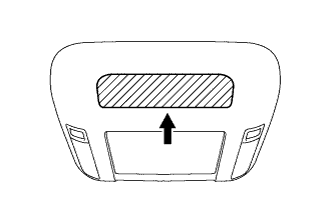
- Clean the infrared ray receiving portion on the television display assembly.
Check whether the same malfunction occurs.
- OK:
- The function returns to normal.
|
NG |
 |
|
|
|
| OK |
|
 |
|
|
| 2. CHECK SYSTEM |
|
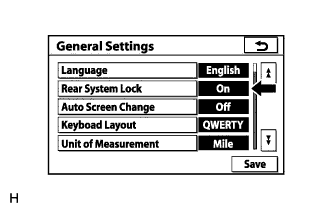
- Check that the remote control operation of the rear system is not locked by the display and navigation module display.
Check that "Rear System Lock" is Off on the "General Settings" screen.
- OK:
- "Rear System Lock" is Off.
|
NG |
 |
|
|
|
| OK |
|
 |
|
| 3. CHECK REMOTE CONTROL (BATTERY) |
|
Check that the dry-cell battery of the remote control is not depleted.
- OK:
- Battery is not depleted.
|
NG |
|
|
| REPLACE REMOTE CONTROL BATTERY |
|
|
| OK |
|
|
|
| 4. REPLACE REMOTE CONTROL |
|
Replace the remote control with a new or known good one.
Check that the television display assembly turns on.
- OK:
- The television display assembly turns on.
|
NG |
|
|
|
|
| OK |
|
|
|
| END (REMOTE CONTROL WAS DEFECTIVE) |
|