INSTALLATION
Removal / installation · Vehicles built Sep 2011 – Dec 2011
Versions by build date: Sep 2011 – Dec 2011 from Jan 2012
| 1.
INSTALL STEERING WHEEL BOSS LOWER COVER |
 |
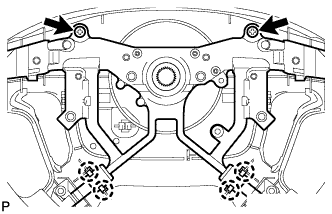
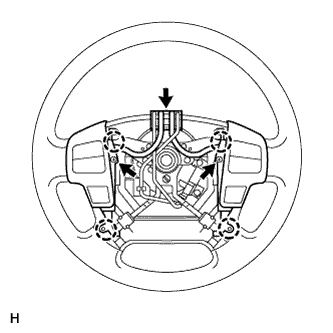
- Attach the 4 claws and 2 screws and install the steering wheel boss lower cover.
| 2.
INSTALL STEERING SHAKE DAMPER |
|
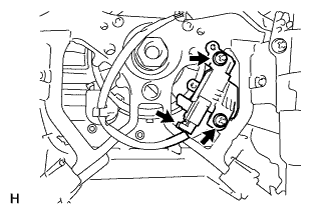
- Install the 2 screws to steering shake damper.
| 3.
INSTALL STEERING PAD COVER LH (w/o Steering Pad Switch) |
|
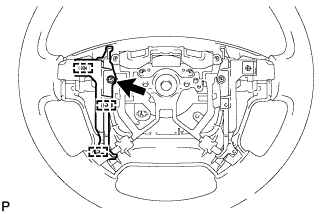
- Install the screw and 4 guide pins, install the steering pad cover LH.
| 4.
INSTALL STEERING PAD COVER RH (w/o Steering Pad Switch) |
|
- HINT:
- Use the same procedures described for the LH side.
| 5.
INSTALL STEERING WHEEL ASSEMBLY |
|
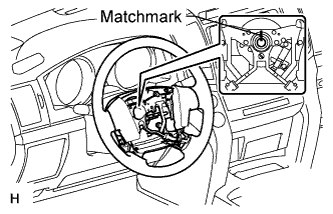
- Align the matchmarks on the steering wheel assembly and steering main shaft assembly.
Install the steering wheel assembly set nut.
-
Torque:
- 50 N*m{
510 kgf*cm
, 37 ft.*lbf
}
| 6.
INSTALL CRUISE CONTROL MAIN SWITCH (w/ Cruise Control System) |
|
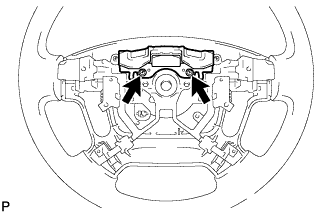
- Install the cruise control main switch with the 2 screws.
Connect the connector.
| 7.
INSTALL STEERING PAD SWITCH ASSEMBLY (w/ Steering Pad Switch) |
|
- Attach the 4 claws to install the steering pad switch.
Install the 2 screws.
Connect the connector.
| 8.
INSTALL STEERING PAD (w/ Airbag System)
|
|
- Support the steering pad with one hand.
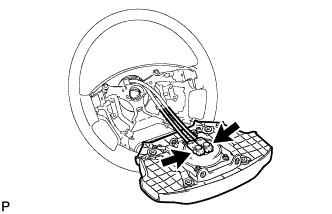
Connect the 2 connectors to the steering pad.
- NOTICE:
- When handling the airbag connector, take care not to damage the airbag wire harness.
Connect the horn connector.
Confirm that the circumference groove of the "TORX" screw fits in the screw case, and place the steering pad onto the steering wheel.
Using a T30 "TORX" socket wrench, tighten the 2 screws.
-
Torque:
- 8.8 N*m{
90 kgf*cm
, 78 in.*lbf
}
| 9.
INSTALL STEERING PAD (w/o Airbag System) |
|
- HINT:
- Refer to the step "INSTALL STEERING PAD (w/ Airbag System)".
| 10.
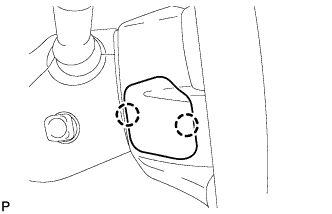
INSTALL LOWER NO. 2 STEERING WHEEL COVER
|
|
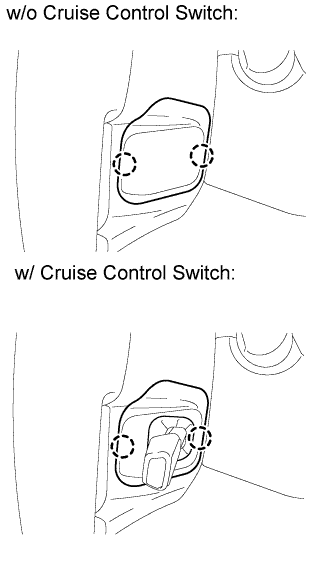
- Attach the 2 claws to install the cover.
| 11.
INSTALL LOWER NO. 3 STEERING WHEEL COVER
|
|
- Attach the 2 claws to install the cover.
| 12.
CONNECT CABLE TO NEGATIVE BATTERY TERMINAL |
|
- NOTICE:
- When disconnecting the cable, some systems need to be initialized after the cable is reconnected (Click here).
| 13.
CHECK SRS WARNING LIGHT |
|
Check the SRS warning light (Click here).