RM2660E
_51
Engine / Hybrid System
_052789
3UR-FE INTAKE / EXHAUST
_0255167
VACUUM SWITCHING VALVE(for ACIS)
G
3UR-FE INTAKE / EXHAUST VACUUM SWITCHING VALVE(for ACIS) ON-VEHICLE INSPECTION
PROCEDURE

 11209
1.REMOVE V-BANK COVER SUB-ASSEMBLY
25860
2.INSPECT VACUUM SWITCHING VALVE ASSEMBLY (for ACIS)
a.
Disconnect the vacuum switching valve connector.
b.
1.01,4.24 1.25,4.24
false
0.583,0.74 0.927,0.74
false
0.771,1 1.031,0.896
false
1.313,4.156 1.469,4.313
0.156,0.156
10
false
*a
0.667,0.927 0.771,1.125
0.104,0.198
10
false
1
0.458,0.667 0.563,0.844
0.104,0.177
10
false
2
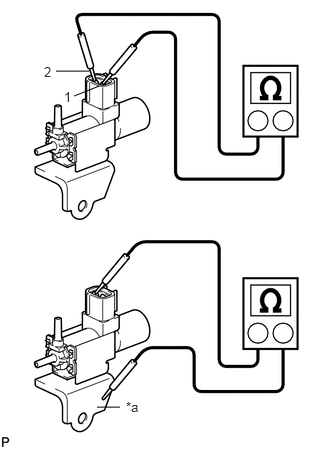
Measure the resistance according to the value(s) in the table below.
| *a | Body Ground |
- Standard Resistance:
Tester Connection Condition Specified Condition 1 - 2 20°C (68°F) 37 to 44 Ω 1 - Body ground Always 1 MΩ or higher 2 - Body ground
If the result is not as specified, replace the vacuum switching valve assembly.
c.
2.093,1.577 2.277,1.733
0.184,0.156
10
*1
2.197,1.169 2.197,1.555
false
0.966,0.45 1.173,0.592
0.207,0.142
10
*a
1.407,0.805 1.570,0.947
0.163,0.142
10
E
0.932,1.325 1.053,1.481
0.121,0.156
10
F
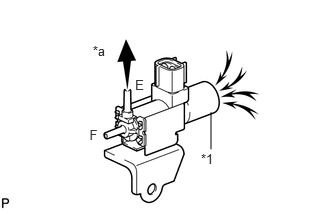
When applying vacuum to port E, check that air is sucked into the filter.
| *1 | Filter |
| *a | Vacuum |
If the result is not as specified, replace the vacuum switching valve assembly.
d.
1.469,0.677 2.021,0.677
true
1.063,0.198 1.135,0.198
1.135,0.198 1.333,0.625
false
0.208,1.646 0.406,1.823
0.198,0.177
10
false
*1
0.75,0.885 0.917,1.094
0.167,0.208
10
false
E
0.615,1.177 0.74,1.344
0.125,0.167
10
false
F
2.063,0.594 2.188,0.76
0.125,0.167
10
false
2
0.938,0.125 1.063,0.292
0.125,0.167
10
false
1
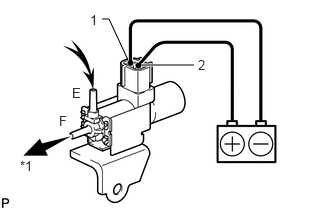
Apply battery voltage to the connector, and check the VSV operation.
- OK:
Measurement Condition Specified Condition Battery positive (+) → Terminal 1
Battery negative (-) → Terminal 2Air is sucked into port E when a vacuum is applied to port F
| *a | Vacuum |
If the result is not as specified, replace the vacuum switching valve assembly.
e.
Connect the vacuum switching valve connector.
11209
3.INSTALL V-BANK COVER SUB-ASSEMBLY