AUDIO / VIDEO REAR DOOR SPEAKER REMOVAL
CAUTION / NOTICE / HINT
- HINT:
- ·
Use the same procedures for the LH side and RH side.
·The procedures listed below are for the LH side.
PROCEDURE

 1. PRECAUTION
- NOTICE:
-
After turning the ignition switch off, waiting time may be required before disconnecting the cable from the battery terminal. Therefore, make sure to read the disconnecting the cable from the battery terminal notice before proceeding with work (See page General>INTRODUCTION>REPAIR INSTRUCTION>PRECAUTION).
2.DISCONNECT CABLE FROM NEGATIVE BATTERY TERMINAL
- NOTICE:
-
When disconnecting the cable, some systems need to be initialized after the cable is reconnected (See page General>INTRODUCTION>REPAIR INSTRUCTION>INITIALIZATION).
69278C
3.REMOVE REAR DOOR INSIDE HANDLE BEZEL LH
74280
4.REMOVE REAR DOOR ARMREST BASE PANEL ASSEMBLY LH
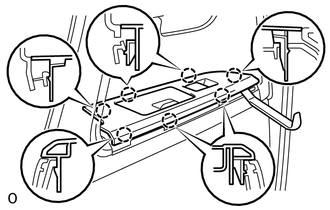
Using a moulding remover, detach the 7 claws.
Disconnect the connector and remove the armrest base panel.
74646
5.REMOVE DOOR ASSIST GRIP COVER LH
67604
6.REMOVE REAR DOOR TRIM BOARD SUB-ASSEMBLY
86160C
7.REMOVE REAR SPEAKER SET
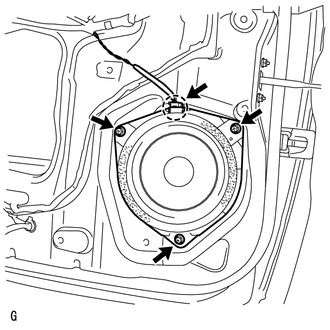
Disconnect the speaker connector.
Remove the 3 screws.
Detach the claw and remove the speaker.
- NOTICE:
-
Do not touch the cone part of the speaker.
86160Z
8.REMOVE REAR NO. 3 SPEAKER ASSEMBLY (for 14 Speakers)
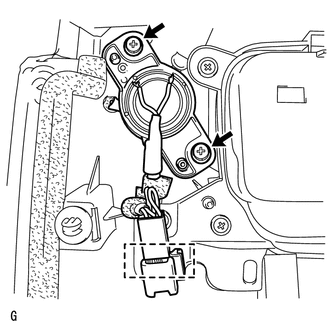
Disconnect the connector.
Detach the clamp.
Remove the 2 screws and speaker.
- NOTICE:
-
Do not touch the cone part of the speaker.