AUDIO / VIDEO AUDIO AND VISUAL SYSTEM(w/o Stereo Component Amplifier) Tape is Tangled due to Incorrect Tape Speed or Auto-Reverse Malfunction
PROCEDURE
Check for any foreign objects.
Check that no foreign objects or defects are detected in the cassette tape player of the radio receiver assembly.
- OK:
No foreign objects or defects are detected.
OK
NG
Replace the cassette tape with another one and recheck.
Replace the cassette tape with another normal one (90 minutes or less) to see if the same trouble occurs again.
- OK:
Malfunction disappears.
OK
(See pageAudio / Visual / Telematics>AUDIO / VIDEO>RADIO RECEIVER (w/o Stereo Component Amplifier)>REMOVAL)
NG
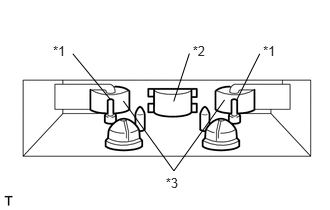
Head cleaning
Raise the cassette door with your finger. Using a pencil or similar object, push in the guide.
Using a cleaning pen or cotton applicator soaked in cleaner, clean the head surface, pinch rollers and capstans.
Check if the same trouble occurs again.
- OK:
Malfunction disappears.
| *1 | Capstan |
| *2 | Head |
| *3 | Pinch Roller |
OK
NG
(See pageAudio / Visual / Telematics>AUDIO / VIDEO>RADIO RECEIVER (w/o Stereo Component Amplifier)>REMOVAL)