RM2660E
_56
Audio / Visual / Telematics
_052829
NAVIGATION / MULTI INFO DISPLAY
_0255494
NAVIGATION SYSTEM
J
NAVIGATION / MULTI INFO DISPLAY NAVIGATION SYSTEM Screen Flicker or Color Distortion
CAUTION / NOTICE / HINT
- NOTICE:
-
Depending on the parts that are replaced during vehicle inspection or maintenance, performing initialization, registration or calibration may be needed. Refer to Precaution for Navigation System (See page Audio / Visual / Telematics>NAVIGATION / MULTI INFO DISPLAY>NAVIGATION SYSTEM>PRECAUTION).
PROCEDURE
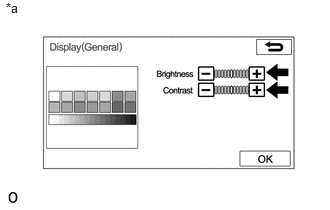
1.CHECK DISPLAY SETTING
a.
0.06,0 0.336,0.230
0.276,0.230
10
*a
Display the "Display (General)" screen.
b.
Reset display settings (contrast, brightness) and check that the screen appears normal.
- OK:
The display returns to normal.
| *a | Example |
OK
PROCEED TO NEXT SUSPECTED AREA SHOWN IN PROBLEM SYMPTOMS TABLE
(See pageAudio / Visual / Telematics>NAVIGATION / MULTI INFO DISPLAY>NAVIGATION SYSTEM>PROBLEM SYMPTOMS TABLE)
NG
REPLACE MULTI-MEDIA MODULE RECEIVER ASSEMBLY