RM2660E
_56
Audio / Visual / Telematics
_052831
PARK ASSIST / MONITORING
_0255504
TELEVISION CAMERA(for Rear)
A
PARK ASSIST / MONITORING TELEVISION CAMERA(for Rear) INSTALLATION
CAUTION / NOTICE / HINT
- HINT:
-
A bolt without a torque specification is shown in the standard bolt chart (See page General>SPECIFICATIONS>STANDARD BOLT>SPECIFIED TORQUE FOR STANDARD BOLTS).
PROCEDURE

 86790D
1.INSTALL REAR TELEVISION CAMERA ASSEMBLY
a.
Connect the connector.
b.
Attach the 4 claws to install the rear television camera assembly.
c.
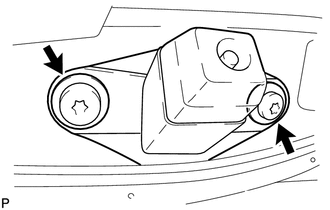
Using a T30 "TORX" socket wrench, install the rear television camera with the 2 screws.
67935B
2.INSTALL BACK DOOR GARNISH
67938A
3.INSTALL BACK DOOR SIDE GARNISH LH
67937B
4.INSTALL BACK DOOR SIDE GARNISH RH
67939B
5.INSTALL CENTER BACK DOOR GARNISH
86790D
6.ADJUST REAR TELEVISION CAMERA ASSEMBLY
a.
w/ Side Monitor System:
b.
w/o Side Monitor System: