TELEMATICS ANTENNA DIVIDER INSTALLATION
PROCEDURE

 1.INSTALL ANTENNA DIVIDER
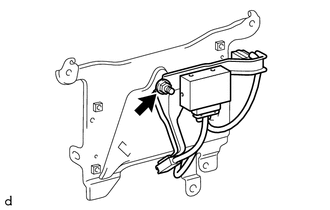
Install the antenna divider with the nut.
- Torque:
- 8.5 N*m (87 kgf*cm, 75 in.*lbf)
86719A
2.INSTALL NO. 1 TELEPHONE BRACKET
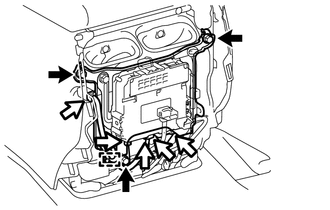
Install the No. 1 telephone bracket with the 3 bolts.
- Torque:
- 8.5 N*m (87 kgf*cm, 75 in.*lbf)
Attach the clam and connect the connectors.
3.CONNECT CABLE TO NEGATIVE BATTERY TERMINAL
- NOTICE:
-
When disconnecting the cable, some systems need to be initialized after the cable is reconnected (See page General>INTRODUCTION>REPAIR INSTRUCTION>INITIALIZATION).
53292A
4.INSTALL UPPER RADIATOR SUPPORT SEAL
5.CHECK SRS WARNING LIGHT
Check the SRS warning light (See page Vehicle Interior>SUPPLEMENTAL RESTRAINT SYSTEMS>AIRBAG SYSTEM>DIAGNOSIS SYSTEM).
6.PERFORM REGISTRATION
Perform registration (See page Audio / Visual / Telematics>TELEMATICS>TELEMATICS SYSTEM (w/ Telematics Transceiver except G-BOOK)>REGISTRATION).
- NOTICE:
-
When replacing the telematics transceiver, perform registration.